用 pip 安装需 Python >=3.10 并自行安装 Tesseract 5 及语言数据;Linux 上还需 wl-clipboard 或 xclip 处理剪贴板;macOS 首次启动需在安全设置中允许未签名应用并授予截屏权限。
flatpak remote-add --if-not-exists flathub https://flathub.org/repo/flathub.flatpakrepo
flatpak install flathub com.github.dynobo.normcap 硬件要求按 README 说明
README 未说明显存或 GPU 要求;提供 Windows x86_64、Linux x86_64、macOS x86_64 与 arm64(M1)预编译包,OCR 由 Tesseract 完成。
支持 Apple Silicon
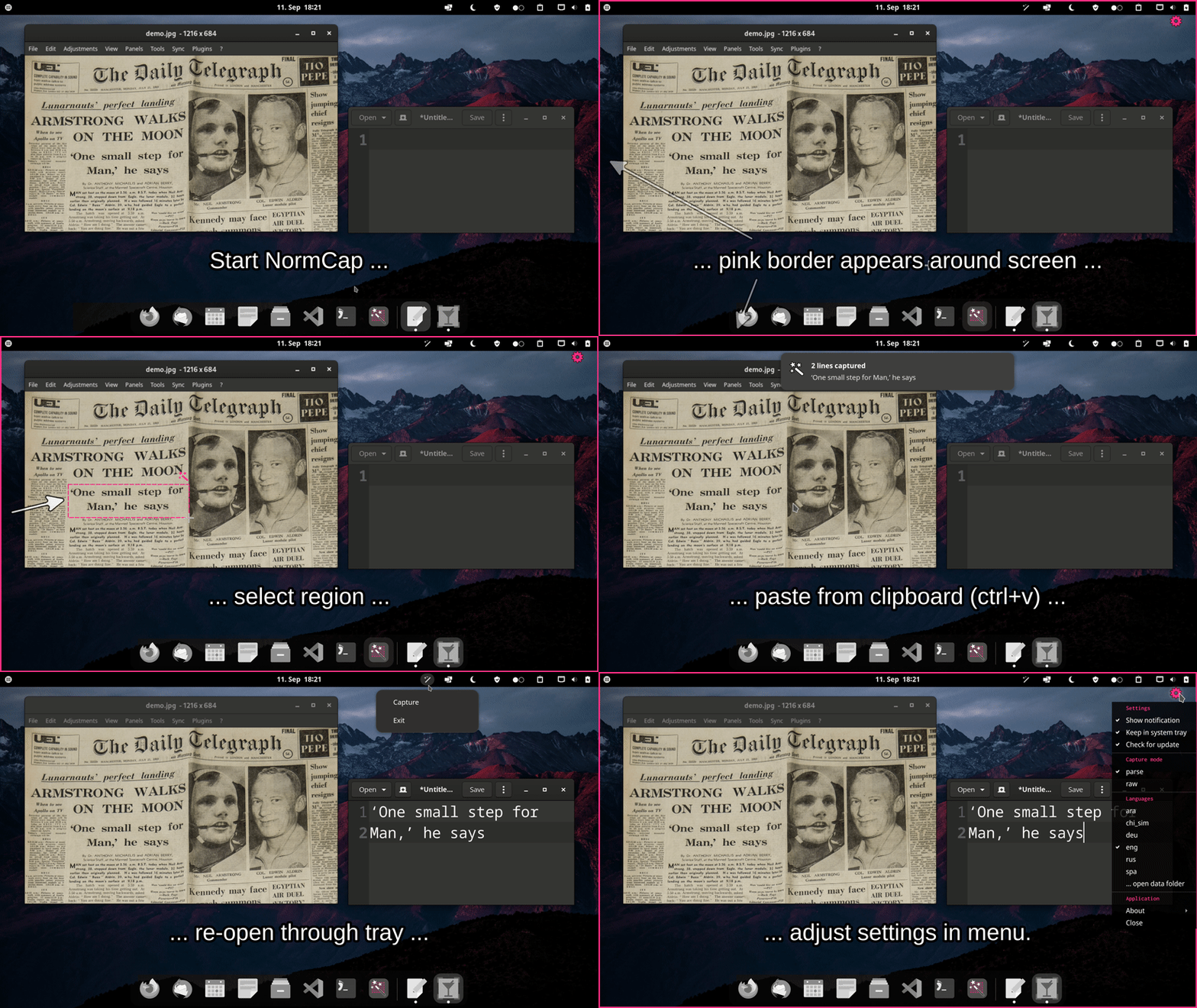
截图后直接 OCR 出文字的跨平台小工具,省去手动抄录屏幕内容
截图后直接识别图中文字并复制到剪贴板,省去手动输入,支持多平台,适合从图片、PDF 或界面中快速提取文本。
核心能力
- 框选屏幕区域后用 Tesseract 识别文字
- 支持识别二维码与条形码
- 识别结果直接写入剪贴板
- 提供 Windows、Linux、macOS 预编译安装包
- 支持通过 Weblate 参与界面多语言翻译
容易踩的坑
内容由模型根据 README 生成,可能不完整或不准确,以官方文档为准。看原文 README
- v0.6.0最新正式版2025-08-31 · 2025-08-31 18:35 UTC
See CHANGELOG for details.
- v0.6.0-beta2pre-release2025-05-05 · 2025-05-05 13:42 UTC
查看更新说明
See CHANGELOG for details.
- v0.6.0-beta1pre-release2025-04-21 · 2025-04-21 20:08 UTC
查看更新说明
See CHANGELOG for details.
- v0.5.92024-11-10 · 2024-11-10 19:44 UTC
查看更新说明
See CHANGELOG for details.
- v0.5.82024-05-19 · 2024-05-19 22:39 UTC
查看更新说明
See CHANGELOG for details.
用户点评
登录用户的真实使用记录,可按版本和硬件筛选共 0 条
还没有人点评。第一个说出真实体验的人最有价值。
NormCap
OCR powered screen-capture tool to capture information instead of images. For Linux, macOS and Windows.


Links: Source Code | Documentation | FAQs | Releases | Changelog
Installation
Choose one of the options for a prebuilt release. If you encounter an issue please take a look at the FAQs or report it.
Windows
- NormCap-0.6.0-x86_64-Windows.msi (Installer)
- NormCap-0.6.0-x86_64-Windows.zip (Portable)
Linux
It's recommended to install NormCap from Flathub:
flatpak remote-add --if-not-exists flathub https://flathub.org/repo/flathub.flatpakrepo
flatpak install flathub com.github.dynobo.normcap
Alternative options:
- NormCap-0.6.0-x86_64.AppImage - ⚠️ deprecated (Requires fuse)
normcap@ AUR (Arch/Manjaro)
macOS
Note: You must allow the unsigned application on first start: "System Preferences" → "Security & Privacy" → "General" → "Open anyway". You also need to allow NormCap to take screenshots. (#135)
- NormCap-0.6.0-x86_64-macOS.dmg (Installer for x86/64)
- NormCap-0.6.0-arm64-macOS.dmg (Installer for M1)
Use Python package
As an alternative to the prebuilt packages above, you can install the NormCap Python package for Python >=3.10, but it requires more setup:
On Linux
# Install dependencies (Ubuntu/Debian)
sudo apt install build-essential tesseract-ocr tesseract-ocr-eng libtesseract-dev libleptonica-dev wl-clipboard

## Install dependencies (Arch)
sudo pacman -S tesseract tesseract-data-eng wl-clipboard

## Install dependencies (Fedora)
sudo dnf install tesseract wl-clipboard

## Install dependencies (openSUSE)
sudo zypper install python3-devel tesseract-ocr tesseract-ocr-devel wl-clipboard

# Install normcap
pip install normcap

#TODO: [HIGH] Describe service and desktop file setup

# Run
./normcap
On macOS
# Install dependencies
brew install tesseract tesseract-lang

# Install normcap
pip install normcap

# Run
./normcap
On Windows
1. Install Tesseract 5 by using the
installer provided by UB Mannheim.
2. Identify the path to the Tesseract base folder. It should contain a /tessdata subfolder
and the tesseract.exe binary. Depending on whether you installed Tesseract system-wide or
in userspace, the base folder should be:
C:\Program Files\Tesseract-OCR
or
C:\Users\<USERNAME>\AppData\Local\Programs\Tesseract-OCR
3. Adjust environment variables:
-
Create an environment variable
TESSDATA_PREFIXand set it to your Tesseract base folder, e.g.: "System Properties" → Tab "Advanced" → "Environment Variables …" → "New …" → Variable:TESSDATA_PREFIX, Value:"C:\Program Files\Tesseract-OCR" -
Append Tesseract's base folder to the environment variable
PATH, e.g.: "System Properties" → Tab "Advanced" → "Environment Variables …" → Section "User variables" → SelectPATH→ "Edit …" → Add a new entry"C:\Program Files\Tesseract-OCR" -
To test your setup, open a new
cmd-terminal and run:tesseract --list-langs
4. Install and run NormCap:
# Install normcap
pip install normcap

# Run
normcap
Development
Prerequisites for setting up a development environment: uv, and Tesseract >=5.0 (including language data).
# Clone repository
git clone https://github.com/dynobo/normcap.git

# Change into project directory
cd normcap

# Create virtual env and install dependencies
uv sync

# Register pre-commit hook
uv run prek install

# Run NormCap in virtual env
uv run python -m normcap
Contribute to UI translations
Please use Weblate to complement or correct text for existing languages as well as for adding new languages.
(If you prefer not to use Weblate, you can also do it manually, but be aware that this is more cumbersome.)
Credits
This project uses the following non-standard libraries:
- pyside6 - bindings for Qt UI Framework
And it depends on external software:
- tesseract - OCR engine
- zxing-cpp - QR & barcode detection
- wl-clipboard - Wayland clipboard utilities
- xclip - CLI to the X11 clipboard
Packaging is done with:
- briefcase - converting Python projects into standalone apps
Thanks to the maintainers of those nice tools!
Similar open source tools
If NormCap doesn't fit your needs, try these alternatives (no particular order):
- TextSnatcher (Linux)
- GreenShot (Windows, macOS)
- TextShot (Windows)
- gImageReader (Linux, Windows)
- Capture2Text (Windows)
- Frog (Linux)
- Textinator (macOS)
- Text-Grab (Windows)
- dpScreenOCR (Linux, Windows)
- PowerToys Text Extractor (Windows)
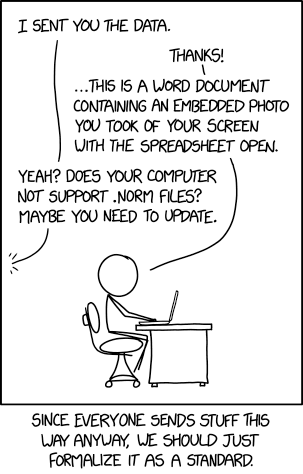
Why "NormCap"?
See XKCD:
Certification
Contributors
Made with contrib.rocks
PaddleOCR
PaddlePaddle·Python
轻量级 OCR 工具包,能把图片和 PDF 转成结构化数据,支持 100 多种语言,方便接入 LLM 和 RAG 流程。
OCR+4文档解析 / OCR
92516+13012kv3.7.02026-09-16 03:31 UTC

MinerU
opendatalab·Python
把 PDF、Office 等复杂文档转成 LLM 可直接用的 Markdown/JSON,内置版面分析和 OCR,专为 RAG 与 Agent 工作流准备语料。
文档解析+4文档解析 / OCR
83425+1706.9kmineru-4.1.7-released2026-11-10 11:15 UTC
tesseract
tesseract-ocr·C++
老牌开源 OCR 引擎,用 LSTM 识别图片中的文字,支持上百种语言,适合做文档扫描和文本提取。
OCR引擎+4文档解析 / OCR
77437+3811k5.5.42026-11-09 11:40 UTC

docling
docling-project·Python
把 PDF、DOCX、HTML 等文档解析成结构化 Markdown 或 JSON,方便喂给大模型和 RAG 流程。
文档解析+4文档解析 / OCR
70364+1245.3kv2.149.02026-11-10 07:57 UTC