环境搭建需参照原始 3DGS 仓库说明,依赖需自行按该仓库配置;diff-gaussian-rasterization 为修改版,需用本仓库自带子模块而非原版;复现论文结果需 A100 80GB 并手动在 scripts/fit_all_scenes.sh 中填写数据集路径
3DGS-LM
lukasHoel长期未更新用 Levenberg-Marquardt 优化器替换 ADAM,加速 3D Gaussian Splatting 的训练收敛,适合需要更快重建速度的 3D 场景。
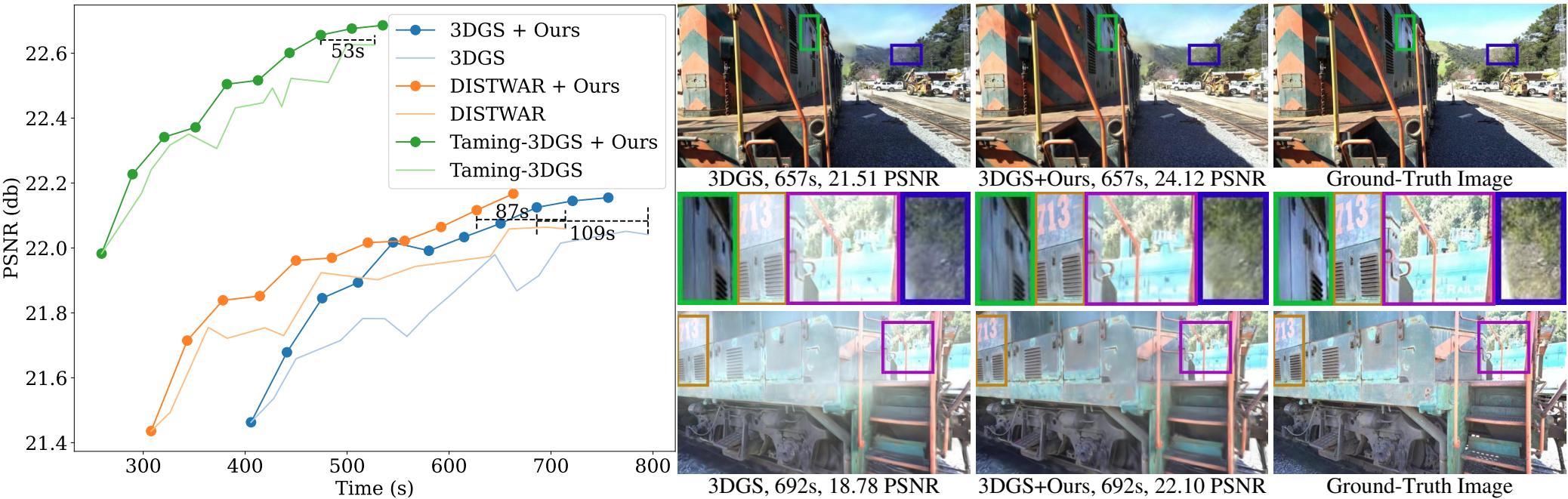
3DGS-LM accelerates Gaussian-Splatting optimization by replacing the ADAM optimizer with Levenberg-Marquardt. (ICCV 2025)
暂无版本299star19fork同步于 2026-11-07 07:30 UTC
git clone --recursive https://github.com/lukasHoel/3DGS-LM
# 环境搭建与原始 3DGS 仓库一致,详见 graphdeco-inria/gaussian-splatting 硬件要求按 README 说明
README 未说明具体显存要求;复现论文结果需在 NVIDIA A100 80GB GPU 上运行。
需要 CUDA
用 Levenberg-Marquardt 替换 ADAM 来加速 3D Gaussian Splatting 优化
用 Levenberg-Marquardt 优化器替换 ADAM,加速 3D Gaussian Splatting 的训练收敛,适合需要更快重建速度的 3D 场景。
核心能力
- 用 LM 优化器替换 ADAM 加速 3DGS 训练
- 提供 CUDA 实现的 Jacobian-vector product 核函数
- 内置稀疏雅可比缓存与 Jacobi 预条件子计算
- 训练后自动渲染并计算 PSNR、SSIM、LPIPS 指标
- 输出 train_stats JSON 记录运行时间与显存消耗
容易踩的坑
内容由模型根据 README 生成,可能不完整或不准确,以官方文档为准。看原文 README
暂无 release 数据(可能没有发版,或尚未同步)。
用户点评
登录用户的真实使用记录,可按版本和硬件筛选共 0 条
还没有人点评。第一个说出真实体验的人最有价值。
3DGS-LM
3DGS-LM accelerates Gaussian-Splatting optimization by replacing the ADAM optimizer with Levenberg-Marquardt.
This is the official repository that contains source code for the ICCV 2025 paper 3DGS-LM.
[arXiv] [Project Page] [Video]

If you find 3DGS-LM useful for your work please cite:
@InProceedings{hoellein_2025_3dgslm,
    title={3DGS-LM: Faster Gaussian-Splatting Optimization with Levenberg-Marquardt},
    author={H{\"o}llein, Lukas and Bo\v{z}i\v{c}, Alja\v{z} and Zollh{\"o}fer, Michael and Nie{\ss}ner, Matthias},
    booktitle={Proceedings of the IEEE/CVF International Conference on Computer Vision (ICCV)},
    year={2025}
}
Setup
We build our method on top of the original 3DGS source code.
Setup of the environment is identical. Please see the original repository for detailed instructions how to set it up: https://github.com/graphdeco-inria/gaussian-splatting.
This code release contains the submodule repositories diff-gaussian-rasterization and simple-knn, so there is no need to clone them from the original source code.
In particular, the diff-gaussian-rasterization module is modified and contains the implementation of our Jacobian-vector product CUDA kernels.
How to fit a scene with 3DGS-LM?
The script train.py is the main entry point to train a scene with our 3DGS-LM method. The arguments/__init__.py file contains additional command line arguments to run our method. One example how to execute our method on the garden scene from the Mip-NeRF 360 dataset:
python train.py \
-s /path/to/360_v2/garden \
--root_out outputs/garden \
--exp_name "3dgs_lm_garden" \
--eval \
--images "images_4" \
--resolution 1 \
--image_subsample_size 25 \
--image_subsample_n_iters 4 \
--image_subsample_frame_selection_mode "strided" \
--num_sgd_iterations_before_gn 20000 \
--perc_images_in_line_search 0.3 \
--pcg_rtol 5e-2 \
--pcg_max_iter 8 \
--min_trust_region_radius 1e-4 \
--trust_region_radius 1e-3 \
--max_trust_region_radius 1e-2 \
--iterations 5 \
--test_iterations 5 \
--save_iterations 5
After training is completed, we automatically start rendering and evaluation scripts that calculate PSNR, SSIM, LPIPS metrics on the test set.
The results are saved to files in the output directory.
The runtime/memory consumption during training is saved in the same output directory to the files train_stats_<iteration>.json, e.g. the file train_stats_5.json contains the argument ellipse_time which specifies the total runtime in seconds after 5 LM iterations.
Reproduce Paper Results
In order to reproduce the Tab.1/Tab.6 results (3DGS+Ours):
- Specify the paths to the 360_v2, db, tandt datasets in
scripts/fit_all_scenes.sh. - Run
bash scripts/fit_all_scenes.shon an NVIDIA A100 80GB GPU. - Results are stored in
outputs/<scene>
Where is the implementation of the LM optimizer?
Here we provide pointers to the main parts in the code that implement the LM optimizer:
The file submodules/diff-gaussian-rasterization/diff_gaussian_rasterization/__init__.py contains python bindings to the c++/cuda extension.
In particular the following methods facilitate the LM implementation:
eval_jtf_and_get_sparse_jacobian: creates the cache and calculatesb = J^T F(x). It refers to thebuildCachekernel in the paper.sort_sparse_jacobians: re-sorts the cache by Gaussians and refers to thesortCacheByGaussianskernel in the paper.calc_preconditioner: calculates the Jacobi preconditioner and refers to thediagJTJkernel in the paper.apply_jtj: calculates the matrix-vector productg = J^T J p. Internally, we make calls to multiple kernels that refer to theapplyJ,applyJT, andsortXkernels.
The implementation of the CUDA kernels can be found in submodules/diff-gaussian-rasterization/cuda_rasterizer/gsgn.cu.
Notably, we define multiple structures GaussianCache* that store all information for the gradient cache in the file submodules/diff-gaussian-rasterization/cuda_rasterizer/rasterizer_impl.h.
The method lm_step in the train.py script calls into the c++/cuda extension to perform one LM iteration as outlined in the paper.

gaussian-splatting
graphdeco-inria·Python
3D Gaussian Splatting 的官方参考实现,用高斯点云做辐射场重建,实现实时可交互的逼真场景渲染。
3D高斯泼溅+43D 重建
24452+203.5k2025-10-17 14:28 UTC
instant-ngp
NVlabs·Cuda
用多分辨率哈希编码把 NeRF、SDF 等神经图形基元的训练从几小时压到几秒,实时渲染三维场景。
神经辐射场+43D 重建
17593+52.1kv2.02026-02-02 12:32 UTC
Open3D
isl-org·C++
Open3D 是一个现代 3D 数据处理库,提供点云、网格、RGB-D 和 3D 可视化等算法与工具,支持 C++ 和 Python,可用于 3D 感知、重建与机器学习研究。
3D数据处理+43D 重建
14192+112.6kv0.20.02026-11-05 18:33 UTC
colmap
colmap·C++
从多张照片重建三维场景的 C++ 工具,集成了运动恢复结构(SfM)和多视图立体(MVS),可输出相机位姿与稠密点云。
三维重建+43D 重建
13196+222.2kdatasets-eth3d-undistorted-v12026-11-10 08:51 UTC