需要 Java 11+ 和 Python 3.11+,未装 JDK 会直接失败;每次 convert() 都会启动一个 JVM 进程,应批量传入文件而非循环调用;混合模式需先启动 opendataloader-pdf-hybrid 后端(默认端口 5002),且首次启动要下载模型可能耗时数分钟;对 tagged PDF 同时用 --use-struct-tree 会跳过混合后端。
opendataloader-pdf
opendataloader-projectApache-2.0活跃维护把 PDF 解析成带坐标信息的 JSON、Markdown 或 HTML,方便喂给 RAG 和 AI 流程,同时自动生成无障碍标签。
PDF Parser for AI-ready data. Automate PDF accessibility. Open-source.
v2.5.20发布于 2026-11-06 02:03 UTC30,272star +63 / 7 天2,899fork同步于 2026-11-10 17:21 UTC
pip install -U opendataloader-pdf
pip install -U "opendataloader-pdf[hybrid]" 硬件要求按 README 说明
README 未说明显存要求;本地模式为 Java 处理,混合模式需另起 AI 后端服务,OCR 引擎如 NVIDIA Nemotron OCR 需 Linux x86_64 + CUDA,Apple Vision 仅限 macOS。
纯 CPU 可运行支持 Apple Silicon需要 CUDA
开源 PDF 解析器,把 PDF 转成适合 RAG/LLM 的结构化数据,并自动生成无障碍 Tagged PDF
把 PDF 解析成带坐标信息的 JSON、Markdown 或 HTML,方便喂给 RAG 和 AI 流程,同时自动生成无障碍标签。
核心能力
- 输出 Markdown、带 bounding box 的 JSON 和 HTML
- 用 XY-Cut++ 保证阅读顺序,每个元素带坐标
- 混合模式把复杂页面交给 AI 后端处理表格、公式和 OCR
- 内置 OCR 支持 80+ 语言,可切换 EasyOCR、Tesseract 等引擎
- 把未标记 PDF 自动转成 Tagged PDF,作为 PDF/UA 基础
容易踩的坑
内容由模型根据 README 生成,可能不完整或不准确,以官方文档为准。看原文 README
- v2.5.20Release v2.5.20最新正式版2026-11-06 · 2026-11-06 02:03 UTC
What's Changed
- chore: begin 2.5.20-SNAPSHOT by @github-actions[bot] in https://github.com/opendataloader-project/opendataloader-pdf/pull/898
- fix(core): accept a PDF whatever its file name by @bundolee in https://github.com/opendataloader-project/opendataloader-pdf/pull/899
Full Changelog: https://github.com/opendataloader-project/opendataloader-pdf/compare/v2.5.19...v2.5.20
- v2.5.19Release v2.5.192026-11-05 · 2026-11-05 10:35 UTC
查看更新说明
What's Changed
- chore: begin 2.5.19-SNAPSHOT by @github-actions[bot] in https://github.com/opendataloader-project/opendataloader-pdf/pull/887
- fix(core): end the last list item of a page at an empty line by @bundolee in https://github.com/opendataloader-project/opendataloader-pdf/pull/889
- fix(core): keep a list of another style out of the item above it by @bundolee in https://github.com/opendataloader-project/opendataloader-pdf/pull/890
- fix(core): start a paragraph after an empty line in a list item by @bundolee in https://github.com/opendataloader-project/opendataloader-pdf/pull/891
- fix: handle invalid input in Java API so batch processing continues (#430) by @hnc-jglee in https://github.com/opendataloader-project/opendataloader-pdf/pull/564
- feat(cli): add --filter-hidden-text to enable hidden-text filtering by @i-Veni-Vidi-Vici in https://github.com/opendataloader-project/opendataloader-pdf/pull/576
- fix(core): keep the text of Type3 fonts without ToUnicode by @bundolee in https://github.com/opendataloader-project/opendataloader-pdf/pull/893
- fix(core): tag sh paints and forms drawn more than once by @bundolee in https://github.com/opendataloader-project/opendataloader-pdf/pull/892
- feat(skills): show the owner of each issue in the odl-fix triage by @bundolee in https://github.com/opendataloader-project/opendataloader-pdf/pull/894
- fix(core): read a column to its end when the other column ends early by @bundolee in https://github.com/opendataloader-project/opendataloader-pdf/pull/895
- chore(deps)!: bump minimatch 10 -> 11 and glob 13 -> 14 in node/ by @bundolee in https://github.com/opendataloader-project/opendataloader-pdf/pull/896
- fix(core): warn when local extraction finds no text by @stratosjl in https://github.com/opendataloader-project/opendataloader-pdf/pull/872
- test: say what the line-order caller does by @bundolee in https://github.com/opendataloader-project/opendataloader-pdf/pull/897
New Contributors
- @stratosjl made their first contribution in https://github.com/opendataloader-project/opendataloader-pdf/pull/872
Full Changelog: https://github.com/opendataloader-project/opendataloader-pdf/compare/v2.5.18...v2.5.19
- v2.5.18Release v2.5.182026-11-04 · 2026-11-04 01:18 UTC
查看更新说明
What's Changed
- chore: begin 2.5.18-SNAPSHOT by @github-actions[bot] in https://github.com/opendataloader-project/opendataloader-pdf/pull/870
- feat(struct-tree): add parameter to ignore artifacts during tagged document processing by @MaximPlusov in https://github.com/opendataloader-project/opendataloader-pdf/pull/871
- fix(markdown): write list labels without a duplicate marker by @TheNetherWatcher in https://github.com/opendataloader-project/opendataloader-pdf/pull/805
- fix(hybrid): re-exec into UTF-8 mode to fix cp949 crash on Korean Windows by @SomSamantray in https://github.com/opendataloader-project/opendataloader-pdf/pull/683
- fix(core): keep a page element above a list item out of the item by @bundolee in https://github.com/opendataloader-project/opendataloader-pdf/pull/873
- feat(python): add timeout parameter to run_jar and convert by @anshulbansod2 in https://github.com/opendataloader-project/opendataloader-pdf/pull/718
- fix(python): read an infinite timeout as no limit by @bundolee in https://github.com/opendataloader-project/opendataloader-pdf/pull/874
- fix(core): keep a wrapped list item line that starts with a dash in its item by @bundolee in https://github.com/opendataloader-project/opendataloader-pdf/pull/879
- fix(markdown): indent a nested list in its list item by @bundolee in https://github.com/opendataloader-project/opendataloader-pdf/pull/881
- fix(core): nest a list below a bullet line in an item of that line by @bundolee in https://github.com/opendataloader-project/opendataloader-pdf/pull/882
- fix(core): do not use a structure tree without a parent tree by @bundolee in https://github.com/opendataloader-project/opendataloader-pdf/pull/883
- fix(core): start a paragraph at a line after an empty line by @bundolee in https://github.com/opendataloader-project/opendataloader-pdf/pull/884
- fix(core): read each column of a signature block as one paragraph by @bundolee in https://github.com/opendataloader-project/opendataloader-pdf/pull/885
- refactor: move content stream tokens out of autotagging, add HtmlGenerator hooks by @bundolee in https://github.com/opendataloader-project/opendataloader-pdf/pull/886
New Contributors
- @TheNetherWatcher made their first contribution in https://github.com/opendataloader-project/opendataloader-pdf/pull/805
- @anshulbansod2 made their first contribution in https://github.com/opendataloader-project/opendataloader-pdf/pull/718
Full Changelog: https://github.com/opendataloader-project/opendataloader-pdf/compare/v2.5.17...v2.5.18
- v2.5.17Release v2.5.172026-10-30 · 2026-10-30 09:54 UTC
查看更新说明
What's Changed
- docs(skills): odl-fix uses the attachment, side-effect, and benchmark tools of odl-review by @bundolee in https://github.com/opendataloader-project/opendataloader-pdf/pull/837
- chore: begin 2.5.17-SNAPSHOT by @github-actions[bot] in https://github.com/opendataloader-project/opendataloader-pdf/pull/839
- chore(deps): patch vite, vitest, certifi and setuptools alerts by @bundolee in https://github.com/opendataloader-project/opendataloader-pdf/pull/840
- chore(python)!: require Python 3.11 or later by @bundolee in https://github.com/opendataloader-project/opendataloader-pdf/pull/843
- chore(deps)!: bump pillow 12.3.0 -> 13.0.0 and the docling family by @bundolee in https://github.com/opendataloader-project/opendataloader-pdf/pull/841
- chore(deps)!: bump filelock 3.32.7 -> 4.2.4 by @bundolee in https://github.com/opendataloader-project/opendataloader-pdf/pull/842
- fix(struct-tree): leave out text in /Artifact sequences by @bundolee in https://github.com/opendataloader-project/opendataloader-pdf/pull/844
- Add createIDTree method to build IDTree for StructTree in AutoTagging by @LonelyMidoriya in https://github.com/opendataloader-project/opendataloader-pdf/pull/832
- fix(hybrid): keep backend page headers and footers for --include-header-footer by @bundolee in https://github.com/opendataloader-project/opendataloader-pdf/pull/847
- fix(tagging): give a link the glyphs whose centre is in it, and a duplicate link none by @bundolee in https://github.com/opendataloader-project/opendataloader-pdf/pull/846
- feat(skills): add an issue triage and a contract harness to odl-fix by @bundolee in https://github.com/opendataloader-project/opendataloader-pdf/pull/849
- fix(core): leave out U+0000 in the text output, as the other writers do by @bundolee in https://github.com/opendataloader-project/opendataloader-pdf/pull/850
- fix(markdown): drop a struck list label and keep the strikethrough markup balanced by @bundolee in https://github.com/opendataloader-project/opendataloader-pdf/pull/853
- test(hybrid): test the real chunk loop and the hybrid CLI options by @bundolee in https://github.com/opendataloader-project/opendataloader-pdf/pull/854
- fix(markdown): escape a heading or list marker at the start of a list item by @bundolee in https://github.com/opendataloader-project/opendataloader-pdf/pull/852
- fix(markdown): keep bullet list items when --sanitize changes the label by @bundolee in https://github.com/opendataloader-project/opendataloader-pdf/pull/855
- fix(tagging): place link boxes in the page space of the text by @bundolee in https://github.com/opendataloader-project/opendataloader-pdf/pull/856
- fix(skills): explicit calls for odl skills and odl-fix follow-ups from #854 by @bundolee in https://github.com/opendataloader-project/opendataloader-pdf/pull/857
- fix(tagging): share one MCID only between text shows that follow each other in the element by @bundolee in https://github.com/opendataloader-project/opendataloader-pdf/pull/858
- fix(markdown): write an image in a line of text at its place in the line by @bundolee in https://github.com/opendataloader-project/opendataloader-pdf/pull/861
- feat(hybrid): start and stop the hybrid server from Python by @bundolee in https://github.com/opendataloader-project/opendataloader-pdf/pull/860
- feat(skills): bounded review in odl-review by @bundolee in https://github.com/opendataloader-project/opendataloader-pdf/pull/863
- feat(core): write URI links in Markdown and HTML with --include-links by @bundolee in https://github.com/opendataloader-project/opendataloader-pdf/pull/862
- feat(hybrid): add --hybrid-availability-timeout for the availability check by @bundolee in https://github.com/opendataloader-project/opendataloader-pdf/pull/865
- fix(tagging): tag text drawn as outlines with its OCR text by @hnc-jglee in https://github.com/opendataloader-project/opendataloader-pdf/pull/866
- feat(hybrid): add --hybrid-triage-log to write the triage decision of each page by @bundole
- v2.5.16Release v2.5.162026-10-27 · 2026-10-27 05:59 UTC
查看更新说明
What's Changed
- chore: begin 2.5.16-SNAPSHOT by @github-actions[bot] in https://github.com/opendataloader-project/opendataloader-pdf/pull/824
- fix(api): close TaggingResult without clearing a later extraction's thread state by @kerthans in https://github.com/opendataloader-project/opendataloader-pdf/pull/811
- test(regression): pin the veraPDF fix for Type3 glyphs that start with d0 by @hnc-jglee in https://github.com/opendataloader-project/opendataloader-pdf/pull/829
- fix(tagging): MCID, header scope and caption fixes from a PDF/UA tag audit by @bundolee in https://github.com/opendataloader-project/opendataloader-pdf/pull/834
- test(tagged-pdf): pin an image with the name of its form in the tagged PDF by @hnc-jglee in https://github.com/opendataloader-project/opendataloader-pdf/pull/831
- feat(skills): replace odl-review with a results-based merge verdict by @bundolee in https://github.com/opendataloader-project/opendataloader-pdf/pull/836
- fix(tagging): scope the first cell of a first row of data to its row by @bundolee in https://github.com/opendataloader-project/opendataloader-pdf/pull/838
New Contributors
- @kerthans made their first contribution in https://github.com/opendataloader-project/opendataloader-pdf/pull/811
Full Changelog: https://github.com/opendataloader-project/opendataloader-pdf/compare/v2.5.15...v2.5.16
用户点评
登录用户的真实使用记录,可按版本和硬件筛选共 0 条
还没有人点评。第一个说出真实体验的人最有价值。
OpenDataLoader PDF
PDF Parser for AI-ready data. Automate PDF accessibility. Open-source.





🔍 PDF parser for AI data extraction — Extract Markdown, JSON (with bounding boxes), and HTML from any PDF. #1 in benchmarks (0.907 overall). Deterministic local mode + AI hybrid mode for complex pages.
- How accurate is it? — #1 in benchmarks: 0.907 overall, 0.928 table accuracy across 200 real-world PDFs including multi-column and scientific papers. Deterministic local mode + AI hybrid mode for complex pages (benchmarks)
- Scanned PDFs and OCR? — Yes. Built-in OCR (80+ languages) in hybrid mode. Works with poor-quality scans at 300 DPI+ (hybrid mode)
- Tables, formulas, images, charts? — Yes. Complex/borderless tables, LaTeX formulas, and AI-generated picture/chart descriptions all via hybrid mode (hybrid mode)
- How do I use this for RAG? —
pip install opendataloader-pdf, convert in 3 lines. Outputs structured Markdown for chunking, JSON with bounding boxes for source citations, and HTML. LangChain integration available. Python, Node.js, Java SDKs (quick start | LangChain)
♿ PDF accessibility automation — Auto-tag untagged PDFs into screen-reader-ready Tagged PDFs at scale. First open-source tool to generate Tagged PDFs end-to-end.
- What's the problem? — Accessibility regulations are now enforced worldwide. Manual PDF remediation costs $50–200 per document and doesn't scale (regulations)
- What's free? — Layout analysis + auto-tagging (Apache 2.0). Untagged PDF in → Tagged PDF out. No proprietary SDK dependency (auto-tagging)
- What about PDF/UA compliance? — Converting Tagged PDF to PDF/UA-1 or PDF/UA-2 is an enterprise add-on. Auto-tagging generates the Tagged PDF; PDF/UA export is the final step (pipeline)
- Why trust this? — Built in collaboration with Dual Lab (veraPDF developers) based on PDF Association specifications, best practice guides and expertise of the PDF Community. Auto-tagging follows the Well-Tagged PDF specification, validated with veraPDF (collaboration)
Get Started in 30 Seconds
Requires: Java 11+ and Python 3.11+ (Node.js | Java also available)
Before you start: run
java -version. If not found, install JDK 11+ from Adoptium.
pip install -U opendataloader-pdf
import opendataloader_pdf

# Batch all files in one call — each convert() spawns a JVM process, so repeated calls are slow
opendataloader_pdf.convert(
    input_path=["file1.pdf", "file2.pdf", "folder/"],
    output_dir="output/",
    format="markdown,json"
)
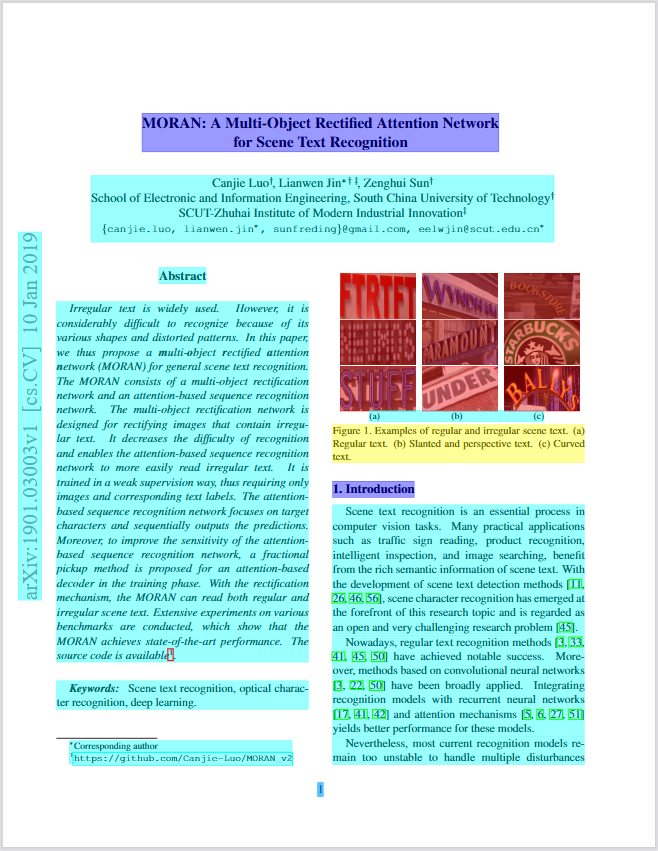
Annotated PDF output — each element (heading, paragraph, table, image) detected with bounding boxes and semantic type.
What Problems Does This Solve?
| Problem | Solution | Status |
|---|---|---|
| PDF structure lost during parsing — wrong reading order, broken tables, no element coordinates | Deterministic local PDF to Markdown/JSON with bounding boxes, XY-Cut++ reading order | Shipped |
| Complex tables, scanned PDFs, formulas, charts need AI-level understanding | Hybrid mode routes complex pages to AI backend (#1 in benchmarks) | Shipped |
| Manual PDF remediation cost — Accessibility regulations (EAA, ADA, Section 508) demand Tagged PDFs. Manual remediation costs $50–200/doc | Auto-tag untagged PDFs into Tagged PDFs (free, Apache 2.0). Foundation for PDF/UA workflows; full PDF/UA-1/2 export is an enterprise add-on | Auto-tag: Shipped. PDF/UA export: Enterprise |
Capability Matrix
| Capability | Supported | Tier |
|---|---|---|
| Data extraction | ||
| Extract text with correct reading order | Yes | Free |
| Bounding boxes for every element | Yes | Free |
| Table extraction (simple borders) | Yes | Free |
| Table extraction (complex/borderless) | Yes | Free (Hybrid) |
| Heading hierarchy detection | Yes | Free |
| List detection (numbered, bulleted, nested) | Yes | Free |
| Image extraction with coordinates | Yes | Free |
| AI chart/image description | Yes | Free (Hybrid) |
| OCR for scanned PDFs | Yes | Free (Hybrid) |
| Formula extraction (LaTeX) | Yes | Free (Hybrid) |
| Tagged PDF structure extraction | Yes | Free |
| AI safety (prompt injection filtering) | Yes | Free |
| Header/footer/watermark filtering | Yes | Free |
| Accessibility | ||
| Auto-tagging → Tagged PDF for untagged PDFs | Yes | Free (Apache 2.0) |
| PDF/UA-1, PDF/UA-2 export | 💼 Available | Enterprise |
| Accessibility studio (visual editor) | 💼 Available | Enterprise |
| Limitations | ||
| Process Word/Excel/PPT | No | — |
| GPU required | No | — |
Extraction Benchmarks
opendataloader-pdf [hybrid] ranks #1 overall (0.907) across reading order, table, and heading extraction accuracy.
| Engine | Overall | Reading Order | Table | Heading | Speed (s/page) | License |
|---|---|---|---|---|---|---|
| opendataloader [hybrid] | 0.907 | 0.934 | 0.928 | 0.821 | 0.463 | Apache-2.0 |
| nutrient | 0.885 | 0.925 | 0.708 | 0.819 | 0.008 | Commercial |
| docling | 0.882 | 0.898 | 0.887 | 0.824 | 0.762 | MIT |
| marker | 0.861 | 0.890 | 0.808 | 0.796 | 53.932 | GPL-3.0 |
| unstructured [hi_res] | 0.841 | 0.904 | 0.588 | 0.749 | 3.008 | Apache-2.0 |
| edgeparse | 0.837 | 0.894 | 0.717 | 0.706 | 0.036 | Apache-2.0 |
| opendataloader | 0.831 | 0.902 | 0.489 | 0.739 | 0.015 | Apache-2.0 |
| mineru | 0.831 | 0.857 | 0.873 | 0.743 | 5.962 | AGPL-3.0 |
| pymupdf4llm | 0.732 | 0.885 | 0.401 | 0.412 | 0.091 | AGPL-3.0 |
| unstructured | 0.686 | 0.882 | 0.000 | 0.388 | 0.077 | Apache-2.0 |
| markitdown | 0.589 | 0.844 | 0.273 | 0.000 | 0.114 | MIT |
| liteparse | 0.576 | 0.866 | 0.000 | 0.000 | 1.061 | Apache-2.0 |
Scores normalized to [0, 1]. Higher is better for accuracy; lower is better for speed. Bold = best. Full benchmark details


Which Mode Should I Use?
| Your Document | Mode | Install | Server Command | Client Command |
|---|---|---|---|---|
| Standard digital PDF | Fast (default) | pip install opendataloader-pdf | None needed | opendataloader-pdf file1.pdf file2.pdf folder/ |
| Complex or nested tables | Hybrid | pip install "opendataloader-pdf[hybrid]" | opendataloader-pdf-hybrid --port 5002 | opendataloader-pdf --hybrid docling-fast file1.pdf file2.pdf folder/ |
| Scanned / image-based PDF | Hybrid + OCR | pip install "opendataloader-pdf[hybrid]" | opendataloader-pdf-hybrid --port 5002 --force-ocr | opendataloader-pdf --hybrid docling-fast file1.pdf file2.pdf folder/ |
| Non-English scanned PDF | Hybrid + OCR | pip install "opendataloader-pdf[hybrid]" | opendataloader-pdf-hybrid --port 5002 --force-ocr --ocr-engine <engine> --ocr-lang <codes> — see Choosing an OCR Engine | opendataloader-pdf --hybrid docling-fast file1.pdf file2.pdf folder/ |
| Mathematical formulas | Hybrid + formula | pip install "opendataloader-pdf[hybrid]" | opendataloader-pdf-hybrid --enrich-formula | opendataloader-pdf --hybrid docling-fast --hybrid-mode full file1.pdf file2.pdf folder/ |
| Charts needing description | Hybrid + picture | pip install "opendataloader-pdf[hybrid]" | opendataloader-pdf-hybrid --enrich-picture-description | opendataloader-pdf --hybrid docling-fast --hybrid-mode full file1.pdf file2.pdf folder/ |
| Nested sections for RAG chunking | Hybrid + heading levels | pip install "opendataloader-pdf[hybrid]" | opendataloader-pdf-hybrid --port 5002 --heading-hierarchy | opendataloader-pdf --hybrid docling-fast file1.pdf file2.pdf folder/ |
| Untagged PDFs needing accessibility | Auto-tagging → Tagged PDF | pip install opendataloader-pdf | None needed | opendataloader-pdf --format tagged-pdf file1.pdf file2.pdf folder/ |
Quick Start
Python
pip install -U opendataloader-pdf
import opendataloader_pdf

# Batch all files in one call — each convert() spawns a JVM process, so repeated calls are slow
opendataloader_pdf.convert(
    input_path=["file1.pdf", "file2.pdf", "folder/"],
    output_dir="output/",
    format="markdown,json"
)
Node.js
npm install @opendataloader/pdf
import { convert } from '@opendataloader/pdf';

await convert(['file1.pdf', 'file2.pdf', 'folder/'], {
  outputDir: 'output/',
  format: 'markdown,json'
});
Java
<dependency>
  <groupId>org.opendataloader</groupId>
  <artifactId>opendataloader-pdf-core</artifactId>
</dependency>
Python Quick Start | Node.js Quick Start | Java Quick Start
Hybrid Mode: #1 Accuracy for Complex PDFs
Hybrid mode combines fast local Java processing with AI backends. Simple pages stay local (0.02s); complex pages route to AI for +90% table accuracy.
Don't combine with
--use-struct-treeon tagged PDFs.--use-struct-treetakes precedence, so the hybrid backend is not called (a warning is logged). If you want the hybrid backend, drop--use-struct-tree.
pip install -U "opendataloader-pdf[hybrid]"
Terminal 1 — Start the backend server:
opendataloader-pdf-hybrid --port 5002
Terminal 2 — Process PDFs:
# Batch all files in one call — each invocation spawns a JVM process, so repeated calls are slow
opendataloader-pdf --hybrid docling-fast file1.pdf file2.pdf folder/
Python:
# Batch all files in one call — each convert() spawns a JVM process, so repeated calls are slow
opendataloader_pdf.convert(
    input_path=["file1.pdf", "file2.pdf", "folder/"],
    output_dir="output/",
    hybrid="docling-fast"
)
Python, without a second terminal — HybridServer starts the backend server for the time of a with block, and stops it after the block:
import opendataloader_pdf

# The server loads its models once. The first start can take minutes while the models download
with opendataloader_pdf.HybridServer() as server:
    opendataloader_pdf.convert(
        input_path=["file1.pdf", "file2.pdf", "folder/"],
        output_dir="output/",
        hybrid="docling-fast",
        hybrid_url=server.url
    )
Give server options in args, as for opendataloader-pdf-hybrid: HybridServer(args=["--force-ocr", "--ocr-lang", "ko,en"]). The server listens on 127.0.0.1 at a free port (port= sets the port). Its log goes to stderr.
OCR for Scanned PDFs
Start the backend with --force-ocr for image-based PDFs with no selectable text:
opendataloader-pdf-hybrid --port 5002 --force-ocr
For non-English documents, specify the language:
opendataloader-pdf-hybrid --port 5002 --force-ocr --ocr-lang "ko,en"
The language codes above are for the default engine (EasyOCR): en, ko, ja, ch_sim, ch_tra, de, fr, ar, and more.
Choosing an OCR Engine
OCR quality varies with the engine, the language, and the document itself (scan resolution, fonts, layout). No engine is best for every document, so run a few representative pages through several engines and compare the output before processing a whole collection.
Select the engine with --ocr-engine. Each engine uses its own language code system for --ocr-lang:
| Engine | --ocr-engine | --ocr-lang example | Platform / extra install |
|---|---|---|---|
| EasyOCR (default) | easyocr | ko,en (ISO 639-1) | Included in opendataloader-pdf[hybrid] |
| RapidOCR | rapidocr | korean (RapidOCR codes: en, ch, japan, korean, ...) | pip install rapidocr onnxruntime |
| Tesseract (CLI) | tesseract | kor,eng (ISO 639-2) | Tesseract binary + language data (e.g. tesseract-ocr-kor) |
| Tesseract (Python binding) | tesserocr | kor,eng (ISO 639-2) | pip install tesserocr + libtesseract |
| Apple Vision | ocrmac | ko-KR,en-US (BCP-47) | macOS only, pip install ocrmac |
| NVIDIA Nemotron OCR | nemotron-ocr | multilingual or english | Linux x86_64 + CUDA, pip install "docling[feat-ocr-nemotron]" |
| Automatic | auto | Not configurable | Docling picks an available engine |
To compare engines on a sample, start one server per engine and send the same file to each.
Terminal 1 — EasyOCR server:
opendataloader-pdf-hybrid --port 5002 --force-ocr --ocr-engine easyocr --ocr-lang "ko,en"
Terminal 2 — Tesseract server:
opendataloader-pdf-hybrid --port 5003 --force-ocr --ocr-engine tesseract --ocr-lang "kor,eng"
Terminal 3 — Send the same sample to both:
opendataloader-pdf sample.pdf --hybrid docling-fast --hybrid-mode full --hybrid-url http://localhost:5002 -o out-easyocr
opendataloader-pdf sample.pdf --hybrid docling-fast --hybrid-mode full --hybrid-url http://localhost:5003 -o out-tesseract
Formula Extraction (LaTeX)
Extract mathematical formulas as LaTeX from scientific PDFs:
# Server: enable formula enrichment
opendataloader-pdf-hybrid --enrich-formula

# Batch all files in one call — each invocation spawns a JVM process, so repeated calls are slow
opendataloader-pdf --hybrid docling-fast --hybrid-mode full file1.pdf file2.pdf folder/
Output in JSON:
{
  "type": "formula",
  "page number": 1,
  "bounding box": [226.2, 144.7, 377.1, 168.7],
  "content": "\\frac{f(x+h) - f(x)}{h}"
}
Note: Formula and picture description enrichments require
--hybrid-mode fullon the client side.
Chart & Image Description
Generate AI descriptions for charts and images — useful for RAG search and accessibility alt text:
# Server
opendataloader-pdf-hybrid --enrich-picture-description

# Batch all files in one call — each invocation spawns a JVM process, so repeated calls are slow
opendataloader-pdf --hybrid docling-fast --hybrid-mode full file1.pdf file2.pdf folder/
Output in JSON:
{
  "type": "image",
  "pdfua_tag": "Figure",
  "id": 285,
  "page number": 1,
  "bounding box": [72.0, 400.0, 540.0, 650.0],
  "alt": "A bar chart showing waste generation by region from 2016 to 2030...",
  "alt_source": "ai-generated"
}
alt_source says where the text came from: original (the PDF's own /Alt), ai-generated,
or missing — and when it is missing, there is no alt field at all.
With --enrich-picture-description, every picture goes to the model whatever its size. The
server reports the tally per request, so a picture that came back without a description shows
up in the log rather than only in the output:
picture_description pictures=4 described=4
Cost follows the number of pictures, not their size: a 40×20 pt logo costs about what a
full-page chart does, and on CPU one picture can take over a minute. A document full of icons
is therefore minutes of work per page, and conversions are serialized, so other requests wait.
--picture-area-threshold 0.05 spends the model only on pictures covering at least 5% of
their page:
picture_description pictures=4 described=1 skipped=3 threshold=0.05
Skips are logged at INFO when you set a threshold, and at WARNING when you did not — in that case nothing was asked to drop them, so the cause is worth a look.
Uses SmolVLM (256M), a lightweight vision model. Custom prompts supported via
--picture-description-prompt. Since the picture count comes from the uploaded file, a server reachable by untrusted callers should set--picture-area-threshold, and--max-file-sizeto cap the conversion work one file can ask for. That limit is applied once the request body has been received, so it bounds conversion cost rather than upload bandwidth or temporary disk.
Heading Hierarchy
The layout model labels a region as a section header without a depth, so by default every heading comes back at level 1 and subsections sit at the same depth as the document title. Flat headings make it hard to tell a section title from a document title when chunking for RAG.
--heading-hierarchy infers the depth — from the PDF outline first, then section numbering
(1. → 1.1 → 1.1.1), then visual style:
# Server
opendataloader-pdf-hybrid --port 5002 --heading-hierarchy

# Client — no extra flag needed
opendataloader-pdf --hybrid docling-fast file1.pdf file2.pdf folder/
  # 3. Methodology
- # 3.1. Multi-Object Rectification Network
+ ## 3.1. Multi-Object Rectification Network
- # Abstract
+ ## Abstract
Numbering covers numbered sections; style is what pulls an unnumbered Abstract or
References out from under the document title.
Off by default, so existing output is unchanged. Levels are capped at H6.
Hancom Data Loader Integration — Coming Soon
Enterprise-grade AI document analysis via Hancom Data Loader — customer-customized models trained on your domain-specific documents. 30+ element types (tables, charts, formulas, captions, footnotes, etc.), VLM-based image/chart understanding, complex table extraction (merged cells, nested tables), SLA-backed OCR for scanned documents, and native HWP/HWPX support. Supports PDF, DOCX, XLSX, PPTX, HWP, PNG, JPG. Live demo
Output Formats
| Format | Use Case |
|---|---|
| JSON | Structured data with bounding boxes, semantic types |
| Markdown | Clean text for LLM context, RAG chunks |
| HTML | Web display with styling |
| Annotated PDF | Visual debugging — see detected structures (sample) |
| Text | Plain text extraction |
Combine formats: format="json,markdown"
JSON Output Example
{
  "type": "heading",
  "id": 42,
  "level": "Title",
  "page number": 1,
  "bounding box": [72.0, 700.0, 540.0, 730.0],
  "heading level": 1,
  "font": "Helvetica-Bold",
  "font size": 24.0,
  "text color": "[0.0]",
  "content": "Introduction"
}
| Field | Description |
|---|---|
type | Element type: heading, paragraph, table, list, image, caption, formula |
id | Unique identifier for cross-referencing |
page number | 1-indexed page reference |
bounding box | [left, bottom, right, top] in PDF points (72pt = 1 inch) |
heading level | Heading depth (1+) |
content | Extracted text |
Advanced Features
Tagged PDF Support
When a PDF has structure tags, OpenDataLoader extracts the exact layout the author intended — no guessing, no heuristics. Headings, lists, tables, and reading order are preserved from the source.
Output quality depends on tag quality. Not all tagged PDFs are well-tagged. For PDFs with sparse or incorrect tags, the default heuristic mode or
--hybrid docling-fastoften produces better results.
--use-struct-treetakes precedence over--hybrid. If both are set on a tagged PDF, the structure tree is used and the hybrid backend is not called (a well-tagged PDF already carries reading order and structure). Drop--use-struct-treeif you want the hybrid backend instead.
# Batch all files in one call — each convert() spawns a JVM process, so repeated calls are slow
opendataloader_pdf.convert(
    input_path=["file1.pdf", "file2.pdf", "folder/"],
    output_dir="output/",
    use_struct_tree=True           # Use native PDF structure tags
)
Most PDF parsers ignore structure tags entirely. Learn more
AI Safety: Prompt Injection Protection
PDFs can contain hidden prompt injection attacks. OpenDataLoader automatically filters:
- Hidden text (transparent, zero-size fonts)
- Off-page content
- Suspicious invisible layers
To sanitize sensitive data (emails, URLs, phone numbers → placeholders), enable it explicitly:
# Batch all files in one call — each invocation spawns a JVM process, so repeated calls are slow
opendataloader-pdf file1.pdf file2.pdf folder/ --sanitize
Custom Sanitization Rules
To use your own rules, give a JSON rules file with --sanitize-rules (Python: sanitize_rules, Node.js: sanitizeRules). This option also turns on --sanitize. Only the rules of the file run, in place of the built-in rules.
{
  "rules": [
    { "id": "kr-mobile", "pattern": "(?<!\\d)01[016789]-\\d{3,4}-\\d{4}(?!\\d)", "replacement": "010-0000-0000" }
  ]
}
opendataloader-pdf file1.pdf folder/ --sanitize-rules rules.json
To keep the built-in rules, start from examples/sanitize-rules/default-rules.json. It has the built-in rules of --sanitize. Copy it, then add, change, or delete rules. If a later release changes the built-in rules, compare your copy with the new template.
Each rule has three keys:
| Key | Value |
|---|---|
id | 1 to 64 characters from a-z, 0-9, and -. Each ID only once |
pattern | A Java regular expression, 1 to 5,000 characters |
replacement | Literal text, 1 to 200 characters, with no control characters ($1 is not a group reference) |
The run stops before any file is processed if the rules file has one of these problems:
- An unknown or missing key, or a value of the wrong type.
- A rule ID that is repeated or has a wrong format.
- A pattern that is empty or does not compile, or a replacement that is empty or has a control character.
- A value over a limit: a file larger than 1 MiB (1,048,576 bytes), more than 200 rules, or a pattern or replacement that is too long.
- No rules.
The error gives the reason, and the rule or the key.
How the rules work:
- All rules run on the original text of each line. A match cannot cross a line, and a rule does not see the placeholder of another rule.
- If two matches overlap, the match that starts first is kept. If they start at the same position, the longer match is kept. If they also have the same length, the match of the earlier rule in the file is kept.
- Rules apply to the extracted text. They do not apply to image descriptions, formulas, or document metadata such as the title.
Warning: A pattern runs on every text line, with no time limit. Some patterns are very slow, also on a short line. For example, nested repetition with limits such as
(a{1,20}){1,20}$can take tens of seconds on a line of 31 characters, and the time grows fast with the length of the line. Some patterns overflow the stack on a long line, for example(a|b)*c. Then that file fails with an error that names the rule, and the run continues with the next file. Use only rules files that you trust. Test each new pattern on lines as long as your real text.
\wmatches only ASCII letters, digits, and_. On Java 19 and later,\buses the same ASCII rule. On Java 11 to 18,\balso counts other letters, such as Hangul, as word characters. Use(?<!\d)and(?!\d)around numbers.
LangChain Integration
pip install -U langchain-opendataloader-pdf
from langchain_opendataloader_pdf import OpenDataLoaderPDFLoader

loader = OpenDataLoaderPDFLoader(
    file_path=["file1.pdf", "file2.pdf", "folder/"],
    format="text"
)
documents = loader.load()
LangChain Docs | GitHub | PyPI
Advanced Options
# Batch all files in one call — each convert() spawns a JVM process, so repeated calls are slow
opendataloader_pdf.convert(
    input_path=["file1.pdf", "file2.pdf", "folder/"],
    output_dir="output/",
    format="json,markdown,pdf",
    image_output="embedded",        # "off", "embedded" (Base64), or "external" (default)
    image_format="jpeg",            # "png" or "jpeg"
    use_struct_tree=True,           # Use native PDF structure
)
PDF Accessibility & PDF/UA Conversion
Problem: Millions of existing PDFs lack structure tags, failing accessibility regulations (EAA, ADA/Section 508, Korea Digital Inclusion Act). Manual remediation costs $50–200 per document and doesn't scale.
OpenDataLoader's approach: Built in collaboration with PDF Association and Dual Lab (developers of veraPDF, the industry-reference open-source PDF/A and PDF/UA validator). Auto-tagging follows the Well-Tagged PDF specification and is validated programmatically using veraPDF — automated conformance checks against PDF accessibility standards, not manual review. No existing open-source tool generates Tagged PDFs end-to-end — most rely on proprietary SDKs for the tag-writing step. OpenDataLoader does it all under Apache 2.0. (collaboration details)
| Regulation | Deadline | Requirement |
|---|---|---|
| European Accessibility Act (EAA) | June 28, 2025 | Accessible digital products across the EU |
| ADA & Section 508 | In effect | U.S. federal agencies and public accommodations |
| Digital Inclusion Act | In effect | South Korea digital service accessibility |
Standards & Validation
| Aspect | Detail |
|---|---|
| Specification | Well-Tagged PDF by PDF Association |
| Validation | veraPDF — industry-reference open-source PDF/A & PDF/UA validator |
| Collaboration | PDF Association + Dual Lab (veraPDF developers) co-develop tagging and validation |
| License | Auto-tagging → Tagged PDF: Apache 2.0 (free). PDF/UA export: Enterprise |
Accessibility Pipeline
| Step | Feature | Status | Tier |
|---|---|---|---|
| 1. Audit | Read existing PDF tags, detect untagged PDFs | Shipped | Free |
| 2. Auto-tag → Tagged PDF | Generate structure tags for untagged PDFs | Shipped | Free (Apache 2.0) |
| 3. Export PDF/UA | Convert to PDF/UA-1 or PDF/UA-2 compliant files | 💼 Available | Enterprise |
| 4. Visual editing | Accessibility studio — review and fix tags | 💼 Available | Enterprise |
💼 Enterprise features are available on request. Contact us to get started.
Auto-Tagging
Generate Tagged PDFs from untagged PDFs — output is a screen-reader-ready PDF with structure tags (headings, paragraphs, lists, tables, reading order).
import opendataloader_pdf

# Untagged PDF in → Tagged PDF out
opendataloader_pdf.convert(
    input_path=["file1.pdf", "file2.pdf", "folder/"],
    output_dir="output/",
    format="tagged-pdf"
)
# CLI
opendataloader-pdf --format tagged-pdf file1.pdf file2.pdf folder/
Combine with other formats: format="json,tagged-pdf".
End-to-End Compliance Workflow
Existing PDFs (untagged)
    │
    ▼
┌─────────────────┐    ┌──────────────────┐    ┌─────────────────┐    ┌──────────────────┐
│  1. Audit       │───>│  2. Auto-Tag     │───>│  3. Export      │───>│  4. Studio       │
│  (check tags)   │    │  (→ Tagged PDF)  │    │  (PDF/UA)       │    │  (visual editor) │
└─────────────────┘    └──────────────────┘    └─────────────────┘    └──────────────────┘
        │                       │                       │                      │
        ▼                       ▼                       ▼                      ▼
  use_struct_tree      format="tagged-pdf"        PDF/UA export       Accessibility Studio
  (Available now)      (Available, Apache 2.0)    (Enterprise)        (Enterprise)
Roadmap
| Feature | Timeline | Tier |
|---|---|---|
| Hancom Data Loader — Enterprise AI document analysis, customer-customized models, VLM-based chart/image understanding, production-grade OCR | Q2-Q3 2026 | Planned |
| Structure validation — Verify PDF tag trees | Q3 2026 | Planned |
Frequently Asked Questions
What is the best PDF parser for RAG?
For RAG pipelines, you need a parser that preserves document structure, maintains correct reading order, and provides element coordinates for citations. OpenDataLoader is designed specifically for this — it outputs structured JSON with bounding boxes, handles multi-column layouts with XY-Cut++, and runs locally without GPU. In hybrid mode, it ranks #1 overall (0.907) in benchmarks.
What is the best open-source PDF parser?
OpenDataLoader PDF is the only open-source parser that combines: rule-based deterministic extraction (no GPU), bounding boxes for every element, XY-Cut++ reading order, built-in AI safety filters, native Tagged PDF support, and hybrid AI mode for complex documents. It ranks #1 in overall accuracy (0.907) while running locally on CPU.
How do I extract tables from PDF for LLM?
OpenDataLoader detects tables using border analysis and text clustering, preserving row/column structure. For complex tables, enable hybrid mode for +90% accuracy improvement (0.489 to 0.928 TEDS score):
# Batch all files in one call — each convert() spawns a JVM process, so repeated calls are slow
opendataloader_pdf.convert(
    input_path=["file1.pdf", "file2.pdf", "folder/"],
    output_dir="output/",
    format="json",
    hybrid="docling-fast"           # For complex tables
)
How does it compare to docling, marker, or pymupdf4llm?
OpenDataLoader [hybrid] ranks #1 overall (0.907) across reading order, table, and heading accuracy. Key differences: docling (0.882) is strong but lacks bounding boxes and AI safety filters. marker (0.861) requires GPU and is 1000x slower (53.932s/page). pymupdf4llm (0.732) is fast but has poor table (0.401) and heading (0.412) accuracy. OpenDataLoader is the only parser that combines deterministic local extraction, bounding boxes for every element, and built-in prompt injection protection. See full benchmark.
Can I use this without sending data to the cloud?
Yes. OpenDataLoader runs 100% locally. No API calls, no data transmission — your documents never leave your environment. The hybrid mode backend also runs locally on your machine. Ideal for legal, healthcare, and financial documents.
Does it support OCR for scanned PDFs?
Yes, via hybrid mode. Install with pip install "opendataloader-pdf[hybrid]", start the backend with --force-ocr, then process as usual. Supports multiple languages including Korean, Japanese, Chinese, Arabic, and more via --ocr-lang, with a choice of OCR engines via --ocr-engine. Quality varies by engine, language, and document — see Choosing an OCR Engine.
Does it work with Korean, Japanese, or Chinese documents?
Yes. For digital PDFs, text extraction works out of the box. For scanned PDFs, use hybrid mode with --force-ocr --ocr-lang "ko,en" (or ja, ch_sim, ch_tra), and compare OCR engines on a sample of your documents — see Choosing an OCR Engine. Coming soon: Hancom Data Loader integration — enterprise-grade AI document analysis with built-in production-grade OCR and customer-customized models optimized for your specific document types and workflows.
How fast is it?
Local mode processes 60+ pages per second on CPU (0.02s/page). Hybrid mode processes 2+ pages per second (0.46s/page) with significantly higher accuracy for complex documents. No GPU required. Benchmarked on Apple M4. Full benchmark details. With multi-process batch processing, throughput exceeds 100 pages per second on 8+ core machines.
Does it handle multi-column layouts?
Yes. OpenDataLoader uses XY-Cut++ reading order analysis to correctly sequence text across multi-column pages, sidebars, and mixed layouts. This works in both local and hybrid modes without any configuration.
What is hybrid mode?
Hybrid mode combines fast local Java processing with an AI backend. Simple pages are processed locally (0.02s/page); complex pages (tables, scanned content, formulas, charts) are automatically routed to the AI backend for higher accuracy. The backend runs locally on your machine — no cloud required. See Which Mode Should I Use? and Hybrid Mode Guide.
Does it work with LangChain?
Yes. Install langchain-opendataloader-pdf for an official LangChain document loader integration. See LangChain docs.
How do I chunk PDFs for RAG?
OpenDataLoader outputs structured Markdown with headings, tables, and lists preserved — ideal input for semantic chunking. Each element in JSON output includes type, heading level, and page number, so you can split by section or page boundary. For most RAG pipelines: parse with format="markdown" for text chunks, or format="json" when you need element-level control. Pair with LangChain's RecursiveCharacterTextSplitter or your own heading-based splitter for best results.
How do I cite PDF sources in RAG answers?
Every element in JSON output includes a bounding box ([left, bottom, right, top] in PDF points) and page number. When your RAG pipeline returns an answer, map the source chunk back to its bounding box to highlight the exact location in the original PDF. This enables "click to source" UX — users see which paragraph, table, or figure the answer came from. No other open-source parser provides bounding boxes for every element by default.
How do I convert PDF to Markdown for LLM?
import opendataloader_pdf

# Batch all files in one call — each convert() spawns a JVM process, so repeated calls are slow
opendataloader_pdf.convert(
    input_path=["file1.pdf", "file2.pdf", "folder/"],
    output_dir="output/",
    format="markdown"
)
OpenDataLoader preserves heading hierarchy, table structure, and reading order in the Markdown output. For complex documents with borderless tables or scanned pages, use hybrid mode (hybrid="docling-fast") for higher accuracy. The output is clean enough to feed directly into LLM context windows or RAG chunking pipelines.
Is there an automated PDF accessibility remediation tool?
Yes. OpenDataLoader is the first open-source tool that automates PDF accessibility end-to-end. Built in collaboration with PDF Association and Dual Lab (veraPDF developers), auto-tagging follows the Well-Tagged PDF specification and is validated programmatically using veraPDF. The layout analysis engine detects document structure (headings, tables, lists, reading order) and generates accessibility tags automatically. Auto-tagging converts untagged PDFs into Tagged PDFs under Apache 2.0 — no proprietary SDK dependency. Use format="tagged-pdf" (Python/Node.js) or --format tagged-pdf (CLI). For organizations needing full PDF/UA compliance, enterprise add-ons provide PDF/UA export and a visual tag editor. This replaces manual remediation workflows that typically cost $50–200+ per document.
Is this really the first open-source PDF auto-tagging tool?
Yes. Existing tools either depend on proprietary SDKs for writing structure tags, only output non-PDF formats (e.g., Docling outputs Markdown/JSON but cannot produce Tagged PDFs), or require manual intervention. OpenDataLoader is the first to do layout analysis → tag generation → Tagged PDF output entirely under an open-source license (Apache 2.0), with no proprietary dependency. Auto-tagging follows the PDF Association's Well-Tagged PDF specification and is validated using veraPDF, the industry-reference open-source PDF/A and PDF/UA validator.
How do I convert existing PDFs to PDF/UA?
OpenDataLoader provides an end-to-end pipeline: audit existing PDFs for tags (use_struct_tree=True), auto-tag untagged PDFs into Tagged PDFs (format="tagged-pdf", free under Apache 2.0), and export as PDF/UA-1 or PDF/UA-2 (enterprise add-on). Auto-tagging follows the PDF Association's Well-Tagged PDF specification and is validated using veraPDF. Auto-tagging generates the Tagged PDF; PDF/UA export is the final step. Contact us for enterprise integration.
How do I make my PDFs accessible for EAA compliance?
The European Accessibility Act requires accessible digital products by June 28, 2025. OpenDataLoader supports the full remediation workflow: audit → auto-tag → Tagged PDF → PDF/UA export. Auto-tagging follows the PDF Association's Well-Tagged PDF specification and is validated using veraPDF, ensuring standards-compliant output. Auto-tagging to Tagged PDF is open-source under Apache 2.0. PDF/UA export and accessibility studio are enterprise add-ons. See our Accessibility Guide.
Is OpenDataLoader PDF free?
The core library is open-source under Apache 2.0 — free for commercial use. This includes all extraction features (text, tables, images, OCR, formulas, charts via hybrid mode), AI safety filters, Tagged PDF support, and auto-tagging to Tagged PDF. We are committed to keeping the core accessibility pipeline (layout analysis → auto-tagging → Tagged PDF) free and open-source. Enterprise add-ons (PDF/UA export, accessibility studio) are available for organizations needing end-to-end regulatory compliance.
Why did the license change from MPL 2.0 to Apache 2.0?
MPL 2.0 requires file-level copyleft, which often triggers legal review before enterprise adoption. Apache 2.0 is fully permissive — no copyleft obligations, easier to integrate into commercial projects. If you are using a pre-2.0 version, it remains under MPL 2.0 and you can continue using it. Upgrading to 2.0+ means your project follows Apache 2.0 terms, which are strictly more permissive — no additional obligations, no action needed on your side.
Documentation
- Quick Start (Python)
- Quick Start (Node.js)
- Quick Start (Java)
- JSON Schema Reference
- CLI Options
- Hybrid Mode Guide
- Tagged PDF Support
- AI Safety Features
- PDF Accessibility
Contributing
We welcome contributions! See CONTRIBUTING.md for guidelines.
License
Note: Versions prior to 2.0 are licensed under the Mozilla Public License 2.0.
Found this useful? Give us a star to help others discover OpenDataLoader.
PaddleOCR
PaddlePaddle·Python
轻量级 OCR 工具包,能把图片和 PDF 转成结构化数据,支持 100 多种语言,方便接入 LLM 和 RAG 流程。
OCR+4文档解析 / OCR
92532+14612kv3.7.02026-09-16 03:31 UTC

MinerU
opendatalab·Python
把 PDF、Office 等复杂文档转成 LLM 可直接用的 Markdown/JSON,内置版面分析和 OCR,专为 RAG 与 Agent 工作流准备语料。
文档解析+4文档解析 / OCR
83449+1946.9kmineru-4.1.7-released2026-11-10 17:04 UTC
tesseract
tesseract-ocr·C++
老牌开源 OCR 引擎,用 LSTM 识别图片中的文字,支持上百种语言,适合做文档扫描和文本提取。
OCR引擎+4文档解析 / OCR
77445+4611k5.5.42026-11-09 11:40 UTC
docling
docling-project·Python
把 PDF、DOCX、HTML 等文档解析成结构化 Markdown 或 JSON,方便喂给大模型和 RAG 流程。
文档解析+4文档解析 / OCR
70385+1455.3kv2.149.02026-11-10 16:54 UTC