需从 Zenodo 单独下载预训练模型,推理用 models_inference_...zip 变体;OCR 功能需额外执行 pip install "eynollah[OCR]",且依赖 Tensorflow(含 tf-keras)或 Torch(含 transformers),CUDA 依赖可能冲突;处理速度较慢,因组合多个深度学习模型与启发式规则。
eynollah
qurator-spkApache-2.0活跃维护面向 OCR 流程的文档版面分析工具,能自动切分页面区域、检测文本行并做二值化,为后续文字识别和 RAG 检索提供干净的结构化输入。
Document Layout Analysis
v0.10.0发布于 2026-11-06 17:34 UTC418star +1 / 7 天37fork同步于 2026-11-10 23:58 UTC
pip install eynollah 硬件要求按 README 说明
README 说明目前支持 Linux 上的 ONNX Runtime;GPU 需安装支持 CUDA 12 的 Nvidia 驱动,ONNX、TensorRT 与 CUDA 运行库(含 cuDNN)由 PyPI 依赖拉取。README 未给出显存要求,也未说明是否支持非 Nvidia GPU。
需要 CUDA
面向历史文档的版面分析工具,用深度学习加启发式规则做分割、二值化与 OCR
面向 OCR 流程的文档版面分析工具,能自动切分页面区域、检测文本行并做二值化,为后续文字识别和 RAG 检索提供干净的结构化输入。
核心能力
- 支持背景、页边、文本区、文本行、标题、图片、表格等 10 类分割
- 文本行可输出边界框或多边形,支持弯曲行与竖排文字
- 内置二值化、图像增强与 CNN-RNN/TrOCR 文本识别
- 检测从左到右或从右到左的阅读顺序
- 输出 PAGE-XML,并提供 OCR-D 接口
容易踩的坑
内容由模型根据 README 生成,可能不完整或不准确,以官方文档为准。看原文 README
- v0.10.0最新正式版2026-11-06 · 2026-11-06 17:34 UTC
🎯 for accuracy improvements 💪 for stability and robustness 🏃 for efficiency :fire: for user attention advised
Fixed:
- 💪 avoid zero division during confidence calculations
- 🎯 textline ordering (horizontal vs. vertical)
- 🎯 edge case: excentric textlines
- 🎯 region angle estimation: numeric range
- 🎯 prediction tiling: avoid self-overlapping windows
- 🎯 early layout segment boundaries: ensure instances are still separated after dilation
- 🎯 cropping: apply upper page bounds to seplines, too
- 💪 edge cases in RO column detector
- 💪 stability in polygon handling
Added:
- CLI subcommand
eynollah extract-pagefor cropping (w/ optional deskewing) - CLI flag
eynollah --versionto get the currently installed version - test coverage for tiling
Removed:
- :fire: Python 3.8 support
Changed:
- refactored further:
- move
do_prediction*toutils.tiling - retrieve external contours directly (instead of filtering from contour tree)
- avoid unnecessary calculations
- remove unused functions
- reduce code duplication
- make code more readable
- update type hinting
- make work with linter
- move
- made page deskewing faster, more robust and precise:
- 🏃 avoid unnecessary floating-point precision for rotations
- 🏃 also downsize 3-6 column pages (for speed)
- introduce a confidence measure
- 🎯💪 stay on 0° if minimum confidence unmet
- 🎯 for multi-column pages, use column signal if better than row signal (as either can be occluded in the layout)
- 🎯🏃 use local maximum optimization instead of slow/imprecise grid search
- region angle estimation:
- 🎯💪 improved accuracy and robustness
- layout model for early regions:
- 🎯 increase tile size for 3-6 column pages (i.e. fewer tiles w/ less myopia :mag:)
- layout model decoding:
- 🎯🏃 deskew text contours directly instead of finding deskewed contours and matching them to original contours
- 🎯 ignore separators from full layout model
- 🎯 ignore too small drop-capitals from full model consistently
- :fire: open holes (i.e. cut into interiors) of separator polygons, allowing for flat segmentation of frames etc.
- increase minimum area for text, table and drop-capital regions
- reduce minimum area for textlines
- rewrote marginalia detection to make faster and more accurate:
- avoid resizing arrays
- forbid points spanned by separators or images
- 1st stage (gap detection): constrain gap prominence, too
- 2nd stage (step detection, i.e. jump+plateau) for marginals close to main
- contour stage (main/marg assignment): precise polygon (re)construction, also splitting partial overlaps
- final stage (textline mask) for splitting textlines
- :fire: add CLI option
--allow_marginalia both|left|right|off(withbothstill default for 1-2 column pages) - optionally (
--paragraphs_from_marginalia): also cut adjacent main regions between closest textline pair (creating paragraphs preceding/following marginalia)
- improve reading order:
- avoid eroding off small regions
- also split pages at horizontal gaps (allowing distinctly columned parts)
- dont' split pages around image regions (cutting them in half)
- don't suppress crossings of horizontal w/ vertical separators
- column detection: fix dtype to prevent underflow
- improve rules for cutting through cross-column regions
- replace within-column ordering by simpler, faster, more robust algorithm (which also enforces the
right2leftsetting) - :fire: order marginalia along with main paragraphs (instead of left→main→right)
- :fire: represent left vs right marginalia by
@custom="layout {sub_type:margi_left;}"(ormargi_right) - :fire: order tables and images along with text regions, too
- :fire: Subcommand
eynollah machine-based-reading-orderrenamed aseynollah reorder - :fire: Trai
- v0.9.22026-07-28 · 2026-07-28 13:42 UTC
查看更新说明
Fixed:
return_deskew_slop: typo caused silent exit for landscape pages, #223, #224, ht @lazyants @SAY-5
Merged PR:
- Fix TypeError in return_deskew_slop on landscape main pages by @SAY-5 in https://github.com/qurator-spk/eynollah/pull/224
- v0.9.12026-07-20 · 2026-07-20 18:09 UTC
查看更新说明
Fixed:
- Base image version must be >= core 3.13.2 for ONNX base image, OCR-D/core#1365
- v0.9.02026-07-20 · 2026-07-20 17:17 UTC
查看更新说明
Fixed:
- CLIs for
reorderand OCR: make work again - more robust predictor/model shutdown
- :fire:
do_order_of_regions: rm overcautious assertion - :fire: correctly order textlines again
- make
utils.contours.make_valid()even more robust - :fire: region-wise deskewing w/o
-cl: typo when only single usable textline - Keras OCR (
cnn-rnn-ocr):training.models: correct config names for height and widthutils_ocr: rare errorsrun_single()w/ooverwrite: skip instead of return
- OCR-D layout processor:
- :fire: resolve filesystem paths for
modelsresource names again - :fire: avoid writing secondary
.xmlinto workspace
- :fire: resolve filesystem paths for
Changed:
- CLIs: remove redundant negative options, add
-heverywhere, show defaults - move
--deviceoption to group level, apply to all model types (including Torch/ONNX) - load models w/
memory_limitinstead ofmemory_growthstrategy (faster and less VRAM) - show full stacktrace in case predictor fails (not just exception name)
- :fire: default to ONNX inference w/ TensorRT instead of TF (much faster, but requires warmup phase w/ persistent cache directory
$XDG_CONFIG_HOME) - :fire: published new set of models, both for training (TF/Keras) and inference (ONNX) – rebuilt from code changes (see below), not retrained
- :fire: Docker image now based on
ocrd/core-cuda-onnxfor layout only, no[OCR]in Docker ATM - OCR: run pages in parallel (as for layout) via forking, add
--halt-failand--num-jobs, too - improve layout:
- for heuristic reading order, do not try to elongate horizontal separators
- when column classifier is confident enough, do maximally enlarge the image (for 6 columns or more)
- improve TrOCR:
- refactor, simplify
- batch over entire page (faster)
- extract confidence, too
- use beam search instead of greedy decoder
- load model and preprocessor/tokenizer into one object (no need for distinct models)
- no need to resize images in advance
- if set, apply
-nmtchere, too - skip lines lower than
-min_confinstead of setting empty string
- improve Keras OCR:
- refactor, simplify
- batch over entire page (faster)
- use correct confidence estimation
- run binarization ad-hoc (if not provided)
- adapt to all-in-one inference model
- get image size from model (instead of fixed)
- apply
-min_confhere, too - skip lines lower than
-min_confinstead of setting empty string - separate off
.pngfiles ifdir_in_bin==dir_in - batch flipped line candidates together with normal lines
- training/setup:
- refactor imports from
.models(single auto-configuredget_model()call, nocustom_objectsloading) - drop new setting
reload_weightsin favour of--rebuildoption for new CLIeynollah-training convert - new CLI for model conversion between Keras (formats HDF5 / native Keras, TF SavedModel), TF-Serving (i.e.
model.export()) and ONNX - extract
MusicRegionfrom PAGE GT, too
- refactor imports from
- training/models:
- ViT models: use Keras
Reshapelayer instead of ad-hoctf.reshape - ViT models: use
tf.map_fnto iterate over batch intf.image.extract_patchesfor attention (faster, less VRAM, makes ONNX conversion work) - Keras (CNN-RNN) OCR backend: replace
Conv1D(channels_first)(not fully supported by TF/CUDNN on CPU) byConv1D(channels_last)w/Permutelayers - Keras (CNN-RNN) OCR training→inference conversion: encapsulate CTC decoder and inverse string lookup by model itself (no need for extra models and files, all on GPU), always ensemble RGB and binarized input
- ViT models: use Keras
Added:
- inference backends for TF-Serving and ONNX/TensorRT, differentiate by loaded model type
- integrate training for TrOCR (still untested!)
- integrate weight ensembling for TrOCR
- integrate standalone inference for TrOCR
- OCR-D processor: pass on more paramete
- CLIs for
- v0.8.02026-05-11 · 2026-05-11 11:18 UTC
查看更新说明
- Optimize model performance
multiprocessing.SpawnProcesspredictor wrapper for models to have commmunication with Tensorflow in a separate subprocess in a task queue with parallel jobs configurable via--num-jobsand maximum number of failed jobs via--halt-fail- Keep batch size low enough for processing fitting into common 8GB GPU (with model-dependent batch resizing prepared but not yet active)
- GPU device can be selected manually with
--device - Handle image resizing and tiling in GPU as much as possible to avoid overhead of switching between GPU and CPU
- jit-compile and precompile models where possible (non-autosized, non-patched Keras models)
- Fix bugs and homogenize internal labels related to differing labels for early layout and different stages of full layout detection
- Replace
Lambdalayers withZeroPadding2D, improving size and optimizability of models foreynollah layout
- Improved training
- Use connected components for loss function
- Integrate with Tensorboard to observe model training progress, including plots and visualizing intermediate evaluation results
- Simplified model usage
- Models can be overridden individually, so any model trained with
eynollah-trainingcan replace any model in the distributions on zenodo --modelis a CLI option of theeynollahroot CLI now and should point to the same directory for all subcommands
- Models can be overridden individually, so any model trained with
- Improved reading order detection heuristics
- Improved drop capital, marginalia and column detection
- Fixing bugs in polygon handling and image operations
- No more self-intersecting polygons
- Correct rotation implementation, enlarging/shrinking canvas as necessary
- Use actual area of a polygon instead of length of polygon path or first candidate for comparisons
- Improved PAGE-XML serialization
- Annotate column classifier result in
/PcGts/Page/@custom(Transkribus convention) and/PcGts/Metadata/Comment(QURATOR convention) - Annotate page skew in
/PcGts/Page/@orientation - Calculate and annotate confidences as
Coords/@conffor regions, lines, images and tables
- Annotate column classifier result in
- Massive refactoring and code quality improvement
- deduplication, idiomatic python, clean parallel processing, class reuse, consistent and meaningful naming
NOTE We are aware of a possible issue with regards to the cropping of images. It appears that we have not consistenly cropped images in training. This can lead to suboptimal results for cropped images. If you experience quality issues with the
eynollah layout, try setting the-ipe/--ignore_page_extractionoption to skip the builtin cropping. We will rectify this in the next trainings. - Optimize model performance
用户点评
登录用户的真实使用记录,可按版本和硬件筛选共 0 条
还没有人点评。第一个说出真实体验的人最有价值。
Eynollah
Document Layout Analysis, Binarization and OCR with Deep Learning Models and Heuristics



Features
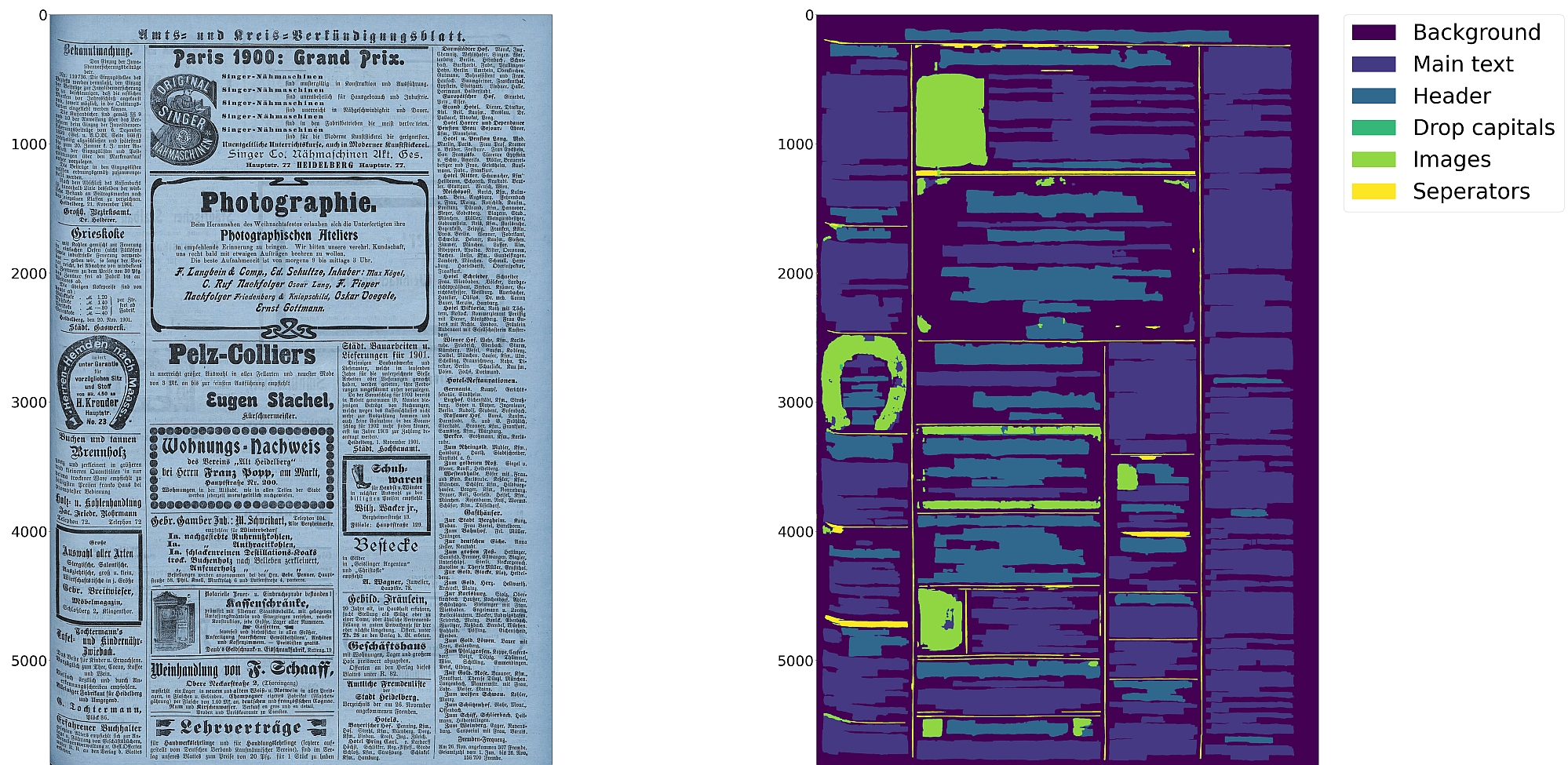
- Document layout analysis with support for 10 segmentation classes:
- background, page border, text region, text line, header, image, separator, marginalia, initial, table
- Textline segmentation to bounding boxes or polygons (including for curved lines and vertical text)
- Binarization
- Text recognition
- Detection of reading order (left-to-right or right-to-left)
- Output in PAGE-XML
- OCR-D interface
:warning: Development is focused on achieving the optimal quality for a wide variety of historical documents using a combination of multiple deep learning models and heuristics; therefore processing can be slow.
Installation
Python 3.9-3.11 with ONNX Runtime on Linux are currently supported.
For GPU support, Nvidia drivers supporting CUDA 12 must be installed. The runtime dependencies will pull in ONNX, TensorRT and CUDA runtime libraries (including cuDNN) from PyPI.
You can either install from PyPI
pip install eynollah
or clone the repository, enter it and install (editable) with
git clone [email protected]:qurator-spk/eynollah.git
cd eynollah; pip install -e .
To also install the dependencies for the OCR engines:
pip install "eynollah[OCR]"
:warning: Requirements for OCR are more involved, as they need Tensorflow (with tf-keras) and/or
Torch (with transformers), which may also have conflicting CUDA dependencies.
An ONNX conversion for these models may be achieved soon.
Models
Pretrained models can be downloaded from Zenodo.
For model documentation and model cards, see models.md.
Two model variants are provided:
- For faster runtime inference, download the ONNX model variants distributed as
models_inference_...zip - For finetuning and training, download the original (Tensorflow / Torch) models distributed as
models_training...zip
To train your own model with Eynollah, see train.md.
Usage
Eynollah supports five use cases:
- layout analysis (segmentation),
- binarization,
- image enhancement,
- text recognition (OCR), and
- reading order detection.
The generic options shared by all subcommands are:
  -m <directory containing model files>
  -mv <model category> <model variant> <model path>
  -D <device specifier>
  -l <log level>
Layout Analysis
Detect layout elements and their reading order.
The command-line interface for layout analysis can be called like this:
eynollah [GENERIC_OPTIONS] layout \
  -i <single image file> | -di <directory containing image files> \
  -o <output directory> \
     [OPTIONS]
The following options can be used to further configure the processing:
| option | description |
|---|---|
-fl | apply full layout analysis including all steps and classes (recommended) |
-tab | apply table detection |
-ae | apply image enhancement (the resulting image is saved to the output directory) |
-as | apply automatic scaling |
-cl | apply contour detection for curved text lines, deskewing all regions independently |
-ib | apply binarization (the resulting bitonal image is saved to the output directory) |
-ep | enable plotting (MUST always be used with -sl, -sd, -sa, -si or -ae) |
-ho | ignore headers for reading order detection |
-si <directory> | save detected image regions to this directory |
-sd <directory> | save deskewed image to this directory |
-sl <directory> | save layout prediction as plot to this directory |
-sp <directory> | save cropped page image to this directory |
-sa <directory> | save all (plot, enhanced/binary image, layout) to this directory |
-thart | confidence threshold of artificial boundary class during textline detection |
-tharl | confidence threshold of artificial boundary class during region detection |
-ncu | set upper limit of columns in document image |
-ncl | set lower limit of columns in document image |
-slro | skip layout detection and reading order |
-romb | apply machine learning based reading order detection |
-ipe | ignore page extraction |
-j | number of CPU jobs to run parallel (useful with -di) |
-H | when to halt when some jobs fail |
Binarization
Perform document image binarization.
The command-line interface for binarization can be called like this:
eynollah [GENERIC_OPTIONS] binarization \
  -i <single image file> | -di <directory containing image files> \
  -o <output directory> \
  [OPTIONS]
Image Enhancement
Enlarge and enhance images. Useful when the scan quality is low.
The command-line interface for image enhancement can be called like this:
eynollah [GENERIC_OPTIONS] enhancement \
  -i <single image file> | -di <directory containing image files> \
  -o <output directory> \
  [OPTIONS]
The following options can be used to further configure the processing:
| option | description |
|---|---|
-sos | save the enhanced image in original image size |
-ncu | upper limit of columns in document image |
-ncl | lower limit of columns in document image |
OCR
Perform text recognition using either a CNN-RNN model (default) or a TrOCR model. Needs a PAGE-XML input file containing textline segmentation information.
The command-line interface for OCR can be called like this:
eynollah [GENERIC_OPTIONS] ocr \
  -i <single image file> | -di <directory containing image files> \
  -xml <page-xml input file> | -dx <directory containing page-xml files> \
  -o <output directory> \
The following options can be used to further configure the processing:
| option | description |
|---|---|
-trocr | use TrOCR model instead of CNN-RNN model |
-dib | directory of binarized images (file type must be '.png'), prediction with both RGB and bin |
-doit | directory for output images rendered with the predicted text |
-nmtc | cropped textline images will not be masked with textline contour |
-bs | OCR inference batch size. Default batch size is 2 for TrOCR and 8 for CNN-RNN models |
-min_conf | minimum OCR confidence value. OCR with textline confidence lower than this will be ignored |
Reading Order Detection
Detect reading order using a machine learning based model. Needs a PAGE-XML input file containing textline segmentation information.
The command-line interface for machine learning based reading order detection can be called like this:
eynollah [GENERIC_OPTIONS] machine-based-reading-order \
  -i <single image file> | -di <directory containing image files> \
  -xml <xml file name> | -dx <directory containing xml files> \
  -o <output directory>
Documentation
Additional documentation:
- For using Eynollah with Docker, see
docker.md. - For using Eynollah with OCR-D, see
ocrd.md. - For advanced use, see
use.md. - For model documentation and model cards, see
models.md. - For model training or fine-tuning, see
train.md. - For a runnable example to use with e.g. Google Colab, see eynollah_layout.ipynb.
How to cite
@inproceedings{hip23rezanezhad,
  title     = {Document Layout Analysis with Deep Learning and Heuristics},
  author    = {Rezanezhad, Vahid and Baierer, Konstantin and Gerber, Mike and Labusch, Kai and Neudecker, Clemens},
  booktitle = {Proceedings of the 7th International Workshop on Historical Document Imaging and Processing {HIP} 2023,
               San José, CA, USA, August 25-26, 2023},
  publisher = {Association for Computing Machinery},
  address   = {New York, NY, USA},
  year      = {2023},
  pages     = {73--78},
  url       = {https://doi.org/10.1145/3604951.3605513}
}
PaddleOCR
PaddlePaddle·Python
轻量级 OCR 工具包,能把图片和 PDF 转成结构化数据,支持 100 多种语言,方便接入 LLM 和 RAG 流程。
OCR+4文档解析 / OCR
92537+15112kv3.7.02026-09-16 03:31 UTC

MinerU
opendatalab·Python
把 PDF、Office 等复杂文档转成 LLM 可直接用的 Markdown/JSON,内置版面分析和 OCR,专为 RAG 与 Agent 工作流准备语料。
文档解析+4文档解析 / OCR
83452+1976.9kmineru-4.2.0-released2026-11-10 17:04 UTC
tesseract
tesseract-ocr·C++
老牌开源 OCR 引擎,用 LSTM 识别图片中的文字,支持上百种语言,适合做文档扫描和文本提取。
OCR引擎+4文档解析 / OCR
77449+5011k5.5.42026-11-10 18:26 UTC

docling
docling-project·Python
把 PDF、DOCX、HTML 等文档解析成结构化 Markdown 或 JSON,方便喂给大模型和 RAG 流程。
文档解析+4文档解析 / OCR
70395+1555.3kv2.150.02026-11-10 17:59 UTC