默认管理员密码是 admin,上生产前必须修改;内置 H2 数据库只适合测试,生产应配 PostgreSQL;DOCS_ADMIN_PASSWORD_INIT 需填 bcrypt 哈希且哈希中的 $ 要写成 $$;数据目录 /data 必须挂载卷,否则数据丢失。

docs
sismicsGPL-2.0活跃维护轻量级文档管理系统,支持 OCR、文件共享和自托管,用 Docker 部署即可获得企业级 DMS 的完整功能。
Lightweight document management system packed with all the features you can expect from big expensive solutions
v1.11发布于 2023-03-12 13:01 UTC2,575star720fork同步于 2026-11-10 11:43 UTC
docker run -p 8080:8080 -v ./docs/data:/data sismics/docs:v1.11 硬件要求按 README 说明
README 未说明显存或 GPU 要求;手动安装需 Java 11、Tesseract 4(OCR)、ffmpeg(视频缩略图)、mediainfo(视频元数据)以及 Jetty/Tomcat 等 Web 容器。
有 Docker 镜像
轻量开源文档管理系统,个人或企业都能自建,替代昂贵的大型文档方案
轻量级文档管理系统,支持 OCR、文件共享和自托管,用 Docker 部署即可获得企业级 DMS 的完整功能。
核心能力
- 支持图片、PDF、ODT、DOCX、PPTX 及视频文件
- 内置 OCR 与全文检索,带搜索建议和高亮
- 用 256 位 AES 加密存储文件并支持文件版本管理
- 提供标签嵌套、自定义元数据与工作流系统
- 支持 LDAP 认证、双因素认证和用户组权限
容易踩的坑
内容由模型根据 README 生成,可能不完整或不准确,以官方文档为准。看原文 README
- v1.11最新正式版2023-03-12 · 2023-03-12 13:01 UTC
- Bug fixes
- Dependency upgrades
- Rework MIME types detection
- v1.102022-01-02 · 2022-01-02 16:03 UTC
查看更新说明
- Exact search by title using
title:mytitle - Bug fixes
- Exact search by title using
- v1.92021-01-25 · 2021-01-25 20:29 UTC
查看更新说明
- Performance on low-end systems
- Inbox scanning improved
- Importer improved
- LDAP support
- Greek, Italian and Polish translation
- OCR for more languages
- Bug fixes
- v1.82020-03-26 · 2020-03-26 19:05 UTC
查看更新说明
- Search documents by file type
- UI improvements
- Bug fixes
- v1.72019-05-21 · 2019-05-21 14:11 UTC
查看更新说明
- Custom user-defined metadata
- Spanish translation
- Turkish and Hebrew language support
- Many small UI fixes and quality of life improvements
用户点评
登录用户的真实使用记录,可按版本和硬件筛选共 0 条
还没有人点评。第一个说出真实体验的人最有价值。


Teedy is an open source, lightweight document management system for individuals and businesses.
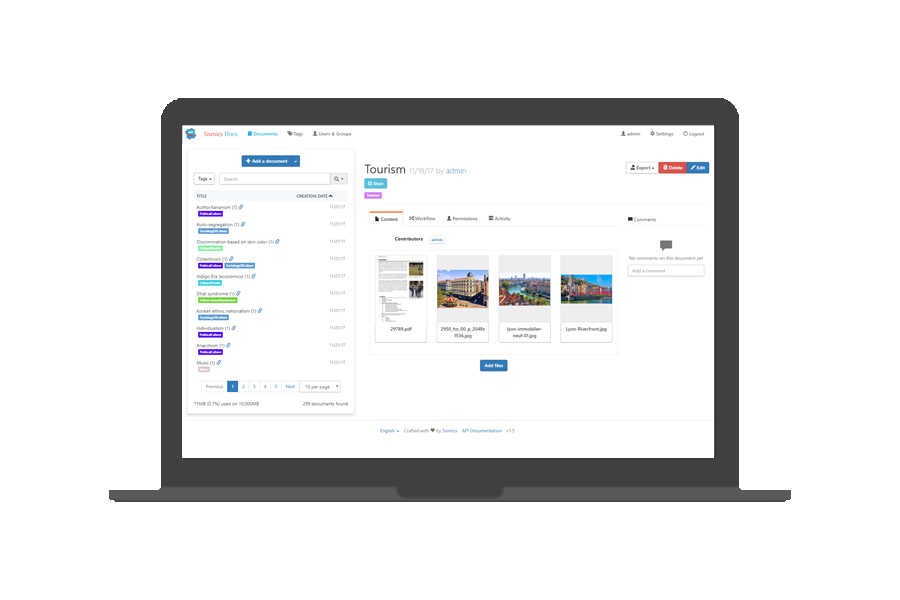
Demo
A demo is available at demo.teedy.io
- Guest login is enabled with read access on all documents
- "admin" login with "admin" password
- "demo" login with "password" password
Features
- Responsive user interface
- Optical character recognition
- LDAP authentication

- Support image, PDF, ODT, DOCX, PPTX files
- Video file support
- Flexible search engine with suggestions and highlighting
- Full text search in all supported files
- All Dublin Core metadata
- Custom user-defined metadata
- Workflow system
- 256-bit AES encryption of stored files
- File versioning
- Tag system with nesting
- Import document from email (EML format)
- Automatic inbox scanning and importing
- User/group permission system
- 2-factor authentication
- Hierarchical groups
- Audit log
- Comments
- Storage quota per user
- Document sharing by URL
- RESTful Web API
- Webhooks to trigger external service
- Fully featured Android client
- Bulk files importer (single or scan mode)
- Tested to one million documents
Install with Docker
A preconfigured Docker image is available, including OCR and media conversion tools, listening on port 8080. If no PostgreSQL config is provided, the database is an embedded H2 database. The H2 embedded database should only be used for testing. For production usage use the provided PostgreSQL configuration (check the Docker Compose example)
The default admin password is "admin". Don't forget to change it before going to production.
- Master branch, can be unstable. Not recommended for production use:
sismics/docs:latest - Latest stable version:
sismics/docs:v1.11
The data directory is /data. Don't forget to mount a volume on it.
To build external URL, the server is expecting a DOCS_BASE_URL environment variable (for example https://teedy.mycompany.com)
Available environment variables
-
General
DOCS_BASE_URL: The base url used by the application. Generated url's will be using this as base.DOCS_GLOBAL_QUOTA: Defines the default quota applying to all users.DOCS_BCRYPT_WORK: Defines the work factor which is used for password hashing. The default is10. This value may be4...31including4and31. The specified value will be used for all new users and users changing their password. Be aware that setting this factor to high can heavily impact login and user creation performance.
-
Admin
DOCS_ADMIN_EMAIL_INIT: Defines the e-mail-address the admin user should have upon initialization.DOCS_ADMIN_PASSWORD_INIT: Defines the password the admin user should have upon initialization. Needs to be a bcrypt hash. Be aware that$within the hash have to be escaped with a second$.
-
Database
DATABASE_URL: The jdbc connection string to be used byhibernate.DATABASE_USER: The user which should be used for the database connection.DATABASE_PASSWORD: The password to be used for the database connection.DATABASE_POOL_SIZE: The pool size to be used for the database connection.
-
Language
DOCS_DEFAULT_LANGUAGE: The language which will be used as default. Currently supported values are:eng,fra,ita,deu,spa,por,pol,rus,ukr,ara,hin,chi_sim,chi_tra,jpn,tha,kor,nld,tur,heb,hun,fin,swe,lav,dan
-
E-Mail
DOCS_SMTP_HOSTNAME: Hostname of the SMTP-Server to be used by Teedy.DOCS_SMTP_PORT: The port which should be used.DOCS_SMTP_USERNAME: The username to be used.DOCS_SMTP_PASSWORD: The password to be used.
Examples
In the following examples some passwords are exposed in cleartext. This was done in order to keep the examples simple. We strongly encourage you to use variables with an .env file or other means to securely store your passwords.
Default, using PostgreSQL
version: '3'
services:
# Teedy Application
  teedy-server:
    image: sismics/docs:v1.11
    restart: unless-stopped
    ports:
      # Map internal port to host
      - 8080:8080
    environment:
      # Base url to be used
      DOCS_BASE_URL: "https://docs.example.com"
      # Set the admin email
      DOCS_ADMIN_EMAIL_INIT: "[email protected]"
      # Set the admin password (in this example: "superSecure")
      DOCS_ADMIN_PASSWORD_INIT: "$$2a$$05$$PcMNUbJvsk7QHFSfEIDaIOjk1VI9/E7IPjTKx.jkjPxkx2EOKSoPS"
      # Setup the database connection. "teedy-db" is the hostname
      # and "teedy" is the name of the database the application
      # will connect to.
      DATABASE_URL: "jdbc:postgresql://teedy-db:5432/teedy"
      DATABASE_USER: "teedy_db_user"
      DATABASE_PASSWORD: "teedy_db_password"
      DATABASE_POOL_SIZE: "10"
    volumes:
      - ./docs/data:/data
    networks:
      - docker-internal
      - internet
    depends_on:
      - teedy-db

# DB for Teedy
  teedy-db:
    image: postgres:13.1-alpine
    restart: unless-stopped
    expose:
      - 5432
    environment:
      POSTGRES_USER: "teedy_db_user"
      POSTGRES_PASSWORD: "teedy_db_password"
      POSTGRES_DB: "teedy"
    volumes:
      - ./docs/db:/var/lib/postgresql/data
    networks:
      - docker-internal

networks:
  # Network without internet access. The db does not need
  # access to the host network.
  docker-internal:
    driver: bridge
    internal: true
  internet:
    driver: bridge
Using the internal database (only for testing)
version: '3'
services:
# Teedy Application
  teedy-server:
    image: sismics/docs:v1.11
    restart: unless-stopped
    ports:
      # Map internal port to host
      - 8080:8080
    environment:
      # Base url to be used
      DOCS_BASE_URL: "https://docs.example.com"
      # Set the admin email
      DOCS_ADMIN_EMAIL_INIT: "[email protected]"
      # Set the admin password (in this example: "superSecure")
      DOCS_ADMIN_PASSWORD_INIT: "$$2a$$05$$PcMNUbJvsk7QHFSfEIDaIOjk1VI9/E7IPjTKx.jkjPxkx2EOKSoPS"
    volumes:
      - ./docs/data:/data
Manual installation
Requirements
- Java 11
- Tesseract 4 for OCR
- ffmpeg for video thumbnails
- mediainfo for video metadata extraction
- A webapp server like Jetty or Tomcat
Download
The latest release is downloadable here: https://github.com/sismics/docs/releases in WAR format. The default admin password is "admin". Don't forget to change it before going to production.
How to build Teedy from the sources
Prerequisites: JDK 11, Maven 3, NPM, Grunt, Tesseract 4
Teedy is organized in several Maven modules:
- docs-core
- docs-web
- docs-web-common
First off, clone the repository: git clone git://github.com/sismics/docs.git
or download the sources from GitHub.
Launch the build
From the root directory:
mvn clean -DskipTests install
Run a stand-alone version
From the docs-web directory:
mvn jetty:run
Build a .war to deploy to your servlet container
From the docs-web directory:
mvn -Pprod -DskipTests clean install
You will get your deployable WAR in the docs-web/target directory.
Contributing
All contributions are more than welcomed. Contributions may close an issue, fix a bug (reported or not reported), improve the existing code, add new feature, and so on.
The master branch is the default and base branch for the project. It is used for development and all Pull Requests should go there.
License
Teedy is released under the terms of the GPL license. See COPYING for more
information or see http://opensource.org/licenses/GPL-2.0.
PaddleOCR
PaddlePaddle·Python
轻量级 OCR 工具包,能把图片和 PDF 转成结构化数据,支持 100 多种语言,方便接入 LLM 和 RAG 流程。
OCR+4文档解析 / OCR
92516+10812kv3.7.02026-09-16 03:31 UTC

MinerU
opendatalab·Python
把 PDF、Office 等复杂文档转成 LLM 可直接用的 Markdown/JSON,内置版面分析和 OCR,专为 RAG 与 Agent 工作流准备语料。
文档解析+4文档解析 / OCR
83425+1406.9kmineru-4.1.7-released2026-11-10 11:15 UTC
tesseract
tesseract-ocr·C++
老牌开源 OCR 引擎,用 LSTM 识别图片中的文字,支持上百种语言,适合做文档扫描和文本提取。
OCR引擎+4文档解析 / OCR
77437+3111k5.5.42026-11-09 11:40 UTC

docling
docling-project·Python
把 PDF、DOCX、HTML 等文档解析成结构化 Markdown 或 JSON,方便喂给大模型和 RAG 流程。
文档解析+4文档解析 / OCR
70364+1065.3kv2.149.02026-11-10 07:57 UTC