必须加--recursive克隆,否则缺少diff-surfel-rasterization子模块;训练数据需自行下载(如DTU+COLMAP约3.5GB);DTU预处理数据把mask存在alpha通道,用原版3DGS数据训练时背景可能被遮掉;TnT评测需open3d==0.10.0;相机主点不在图像中心时可能训练不收敛
2d-gaussian-splatting
hbb1活跃维护用 2D 高斯面片做辐射场重建,能同时合成新视角并输出几何精确的表面,解决了传统 3DGS 重建表面粗糙、几何不准的问题。
[SIGGRAPH'24] 2D Gaussian Splatting for Geometrically Accurate Radiance Fields
暂无版本3,332star +1 / 7 天337fork同步于 2026-11-10 23:42 UTC
git clone https://github.com/hbb1/2d-gaussian-splatting.git --recursive
conda env create --file environment.yml
conda activate surfel_splatting 硬件要求按 README 说明
README未说明显存要求;依赖CUDA光栅化子模块diff-surfel-rasterization,需NVIDIA GPU环境
需要 CUDA
用2D有向圆盘表示场景的SIGGRAPH'24官方实现,重建几何精确的辐射场并直接提取网格
用 2D 高斯面片做辐射场重建,能同时合成新视角并输出几何精确的表面,解决了传统 3DGS 重建表面粗糙、几何不准的问题。
核心能力
- 用2D有向圆盘(surfel)表示场景,替代3D高斯
- 采用透视正确的可微光栅化渲染surfel
- 加入法向一致性与深度畸变正则提升重建质量
- 支持有界与无界TSDF融合提取网格
- 提供DTU、MipNeRF360、TnT的完整评测脚本
容易踩的坑
内容由模型根据 README 生成,可能不完整或不准确,以官方文档为准。看原文 README
暂无 release 数据(可能没有发版,或尚未同步)。
用户点评
登录用户的真实使用记录,可按版本和硬件筛选共 0 条
还没有人点评。第一个说出真实体验的人最有价值。
2D Gaussian Splatting for Geometrically Accurate Radiance Fields
Project page | Paper | Video | Surfel Rasterizer (CUDA) | Surfel Rasterizer (Python) | DTU+COLMAP (3.5GB) | SIBR Viewer Pre-built for Windows | Web Viewer

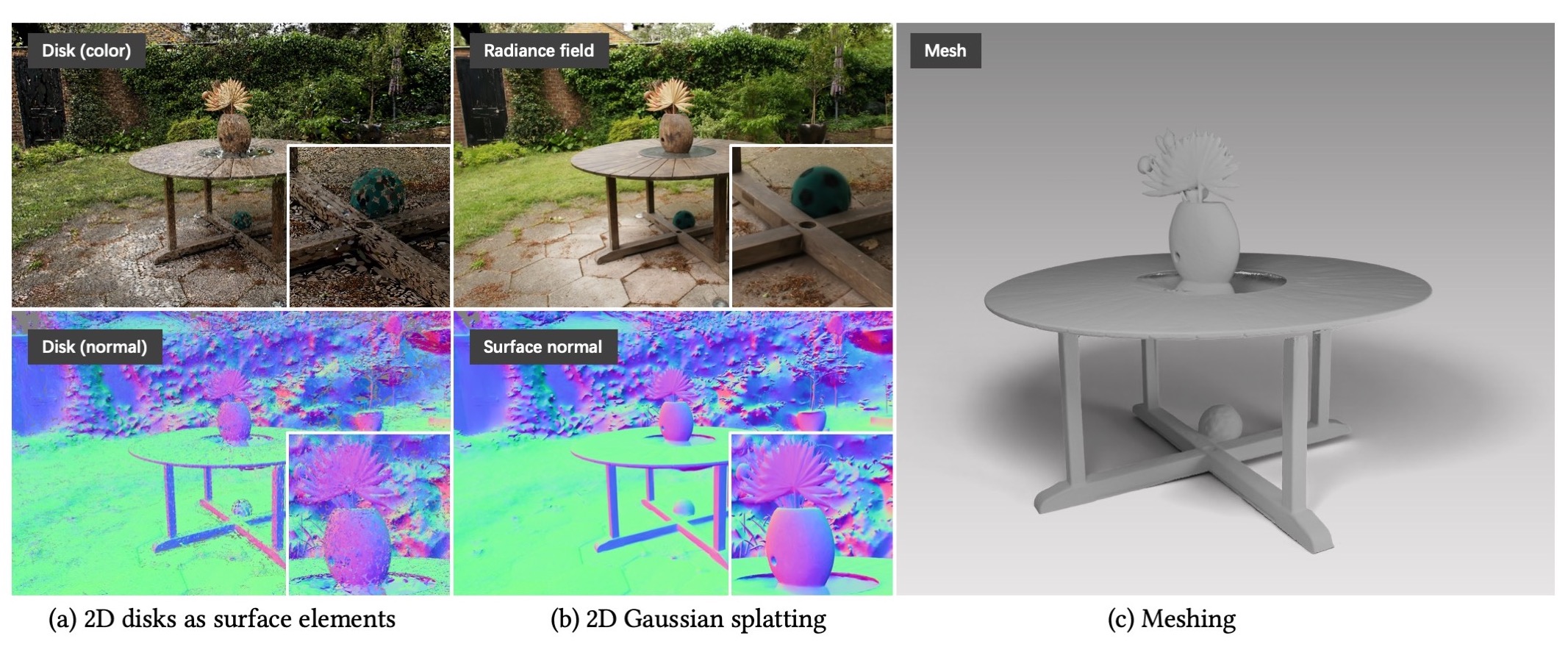
This repo contains the official implementation for the paper "2D Gaussian Splatting for Geometrically Accurate Radiance Fields". Our work represents a scene with a set of 2D oriented disks (surface elements) and rasterizes the surfels with perspective correct differentiable raseterization. Our work also develops regularizations that enhance the reconstruction quality. We also devise meshing approaches for Gaussian splatting.
⭐ New Features
- 2025/12/19: Our work is featured in an in-depth blog post on LearnOpenCV! Thanks to Shubham Anand.
- 2024/07/20: Web-based viewer GaussianSplats3D also supports 2DGS. Thanks to Mark Kellogg.
- 2024/07/19: Colab Notebook is supported! Thanks to atakan-topaloglu
- 2024/06/10: SIBR Viewer is supported! Thanks to Rong.
- 2024/06/05: Remote Viewer based on Viser is supported! Thanks to HwanHeo.
- 2024/05/30: Fixed a bug related to unbounded meshing. The foreground mesh quality should now be consistent with the bounded mesh.
- 2024/05/17: Improve training speed by 30%~40% through the cuda operator fusing. Please update the diff-surfel-rasterization submodule if you have already installed it.
git submodule update --remote pip install submodules/diff-surfel-rasterization - 2024/05/05: Important updates - Now our algorithm supports unbounded mesh extraction! Our key idea is to contract the space into a sphere and then perform adaptive TSDF truncation.

🎓 Community Resources & Tutorials
-
gsplat library documentation (official rasterization API reference)
https://docs.gsplat.studio/main/apis/rasterization.html#id1 -
GaussianSplats3D – Popular WebGL/Three.js viewer with strong community support
https://github.com/mkkellogg/GaussianSplats3D -
SuperSplat – High-performance WebGPU viewer by PlayCanvas
https://github.com/playcanvas/supersplat -
In-Depth Practitioner Guide – Comprehensive tutorial on the full 2D Gaussian Splatting pipeline (theory to implementation) by Shubham Anand
LearnOpenCV Blog Post -
Diff-Surfel-Tracing - A differentiable ray-tracing implementation built on the surfel representation by xbillowy https://github.com/xbillowy/diff-surfel-tracing
SIBR Viewer
The Pre-built Viewer for Windows can be found here. If you use Ubuntu or want to check the viewer usage, please refer to GS Monitor.
How to use
Firstly open the viewer,
<path to downloaded/compiled viewer>/bin/SIBR_remoteGaussian_app_rwdi
and then
# Monitor the training process
python train.py -s <path to COLMAP or NeRF Synthetic dataset>
# View the trained model
python view.py -s <path to COLMAP or NeRF Synthetic dataset> -m <path to trained model>
Installation
# download
git clone https://github.com/hbb1/2d-gaussian-splatting.git --recursive

# if you have an environment used for 3dgs, use it
# if not, create a new environment
conda env create --file environment.yml
conda activate surfel_splatting
Training
To train a scene, simply use
python train.py -s <path to COLMAP or NeRF Synthetic dataset>
Commandline arguments for regularizations
--lambda_normal  # hyperparameter for normal consistency
--lambda_distortion # hyperparameter for depth distortion
--depth_ratio # 0 for mean depth and 1 for median depth, 0 works for most cases
Tips for adjusting the parameters on your own dataset:
- For unbounded/large scenes, we suggest using mean depth, i.e.,
depth_ratio=0, for less "disk-aliasing" artifacts.
Testing
Bounded Mesh Extraction
To export a mesh within a bounded volume, simply use
python render.py -m <path to pre-trained model> -s <path to COLMAP dataset>
Commandline arguments you should adjust accordingly for meshing for bounded TSDF fusion, use
--depth_ratio # 0 for mean depth and 1 for median depth
--voxel_size # voxel size
--depth_trunc # depth truncation
If these arguments are not specified, the script will automatically estimate them using the camera information.
Unbounded Mesh Extraction
To export a mesh with an arbitrary size, we devised an unbounded TSDF fusion with space contraction and adaptive truncation.
python render.py -m <path to pre-trained model> -s <path to COLMAP dataset> --mesh_res 1024
Quick Examples
Assuming you have downloaded MipNeRF360, simply use
python train.py -s <path to m360>/<garden> -m output/m360/garden
# use our unbounded mesh extraction!!
python render.py -s <path to m360>/<garden> -m output/m360/garden --unbounded --skip_test --skip_train --mesh_res 1024
# or use the bounded mesh extraction if you focus on foreground
python render.py -s <path to m360>/<garden> -m output/m360/garden --skip_test --skip_train --mesh_res 1024
If you have downloaded the DTU dataset, you can use
python train.py -s <path to dtu>/<scan105> -m output/date/scan105 -r 2 --depth_ratio 1
python render.py -r 2 --depth_ratio 1 --skip_test --skip_train
Custom Dataset: We use the same COLMAP loader as 3DGS, you can prepare your data following here.
[!WARNING] In our preprocessed DTU dataset, we store the mask in the alpha channel. When using the DTU dataset in the gaussian-splatting repository, please note that the background may be masked. To train DTU with background, we have commented these lines out.
Full evaluation
We provide scripts to evaluate our method of novel view synthesis and geometric reconstruction.
We have re-implemented the repository for improved efficiency, which has slightly impacted performance compared to the original paper. Two factors have influenced this change:
-
📈 We fixed some minor bugs, such as a half-pixel shift in TSDF fusion, resulting in improved geometry reconstruction.
-
📉 We removed the gradient of the low-pass filter used for densification, which reduces the number of Gaussians. As a result, the PSNR has slightly dropped, but we believe this trade-off is worthwhile for real-world applications.
You can report either the numbers from the paper or from this implementation, as long as they are discussed in a comparable setting.
Novel View Synthesis
For novel view synthesis on MipNeRF360 (which also works for other colmap datasets), use
python scripts/m360_eval.py -m60 <path to the MipNeRF360 dataset>
Geometry reconstruction
For geometry reconstruction on DTU dataset, please download the preprocessed data from Drive or Hugging Face. You also need to download the ground truth DTU point cloud.
python scripts/dtu_eval.py --dtu <path to the preprocessed DTU dataset>   \
     --DTU_Official <path to the official DTU dataset>
We provide Evaluation Results (Pretrained, Meshes).
Chamfer distance on DTU dataset (lower is better)
| 24 | 37 | 40 | 55 | 63 | 65 | 69 | 83 | 97 | 105 | 106 | 110 | 114 | 118 | 122 | Mean | |
|---|---|---|---|---|---|---|---|---|---|---|---|---|---|---|---|---|
| Paper | 0.48 | 0.91 | 0.39 | 0.39 | 1.01 | 0.83 | 0.81 | 1.36 | 1.27 | 0.76 | 0.70 | 1.40 | 0.40 | 0.76 | 0.52 | 0.80 |
| Reproduce | 0.46 | 0.80 | 0.33 | 0.37 | 0.95 | 0.86 | 0.80 | 1.25 | 1.24 | 0.67 | 0.67 | 1.24 | 0.39 | 0.64 | 0.47 | 0.74 |
For geometry reconstruction on TnT dataset, please download the preprocessed TnT_data. You also need to download the ground truth TnT_GT, including ground truth point cloud, alignments and cropfiles.
[!IMPORTANT]
Due to historical issue, you should use open3d==0.10.0 for evaluating TNT.
# use open3d 0.18.0, skip metrics
python scripts/tnt_eval.py --TNT_data <path to the preprocessed TNT dataset>   \
     --TNT_GT <path to the official TNT evaluation dataset> --skip_metrics

# use open3d 0.10.0, skip traing and rendering
python scripts/tnt_eval.py --TNT_data <path to the preprocessed TNT dataset>   \
     --TNT_GT <path to the official TNT evaluation dataset> --skip_training --skip_rendering
F1 scores on TnT dataset (higher is better)
| Barn | Caterpillar | Ignatius | Truck | Meetingroom | Courthouse | Mean | |
|---|---|---|---|---|---|---|---|
| Reproduce | 0.41 | 0.23 | 0.51 | 0.45 | 0.17 | 0.15 | 0.32 |
FAQ
-
Training does not converge. If your camera's principal point does not lie at the image center, you may experience convergence issues. Our code only supports the ideal pinhole camera format, so you may need to make some modifications. Please follow the instructions provided here to make the necessary changes. We have also modified the rasterizer in the latest commit to support data accepted by 3DGS. To avoid further issues, please update to the latest commit.
-
No mesh / Broken mesh. When using the Bounded mesh extraction mode, it is necessary to adjust the
depth_truncparameter to perform TSDF fusion to extract meshes. On the other hand, Unbounded mesh extraction does not require tuning the parameters but is less efficient. -
Can 3DGS's viewer be used to visualize 2DGS? Technically, you can export 2DGS to 3DGS's ply file by appending an additional zero scale. However, due to the inaccurate affine projection of 3DGS's viewer, you may see some distorted artefacts. We are currently working on a viewer for 2DGS, so stay tuned for updates.
Acknowledgements
This project is built upon 3DGS. The TSDF fusion for extracting mesh is based on Open3D. The rendering script for MipNeRF360 is adopted from Multinerf, while the evaluation scripts for DTU and Tanks and Temples dataset are taken from DTUeval-python and TanksAndTemples, respectively. The fusing operation for accelerating the renderer is inspired by Han's repodcue. We thank all the authors for their great repos.
Citation
If you find our code or paper helps, please consider citing:
@inproceedings{Huang2DGS2024,
    title={2D Gaussian Splatting for Geometrically Accurate Radiance Fields},
    author={Huang, Binbin and Yu, Zehao and Chen, Anpei and Geiger, Andreas and Gao, Shenghua},
    publisher = {Association for Computing Machinery},
    booktitle = {SIGGRAPH 2024 Conference Papers},
    year      = {2024},
    doi       = {10.1145/3641519.3657428}
}

gaussian-splatting
graphdeco-inria·Python
3D Gaussian Splatting 的官方参考实现,用高斯点云做辐射场重建,实现实时可交互的逼真场景渲染。
3D高斯泼溅+43D 重建
24453+213.5k2025-10-17 14:28 UTC
instant-ngp
NVlabs·Cuda
用多分辨率哈希编码把 NeRF、SDF 等神经图形基元的训练从几小时压到几秒,实时渲染三维场景。
神经辐射场+43D 重建
17593+52.1kv2.02026-02-02 12:32 UTC
Open3D
isl-org·C++
Open3D 是一个现代 3D 数据处理库,提供点云、网格、RGB-D 和 3D 可视化等算法与工具,支持 C++ 和 Python,可用于 3D 感知、重建与机器学习研究。
3D数据处理+43D 重建
14193+122.6kv0.20.02026-11-10 19:59 UTC
colmap
colmap·C++
从多张照片重建三维场景的 C++ 工具,集成了运动恢复结构(SfM)和多视图立体(MVS),可输出相机位姿与稠密点云。
三维重建+43D 重建
13197+232.2kdatasets-eth3d-undistorted-v12026-11-10 08:51 UTC